 ChatGPT ·
 Claude (coming soon)
Where custody evidence usually disappears
The photo of the empty driveway is in a camera roll with four thousand others. The admission is eight months back in a text thread. The school’s note is under promotions in your inbox. None of it is lost, and none of it is findable in five minutes.
The fix is not more screenshots. It is one place where each file is attached to the date and the entry it proves, which is what the evidence vault is for.
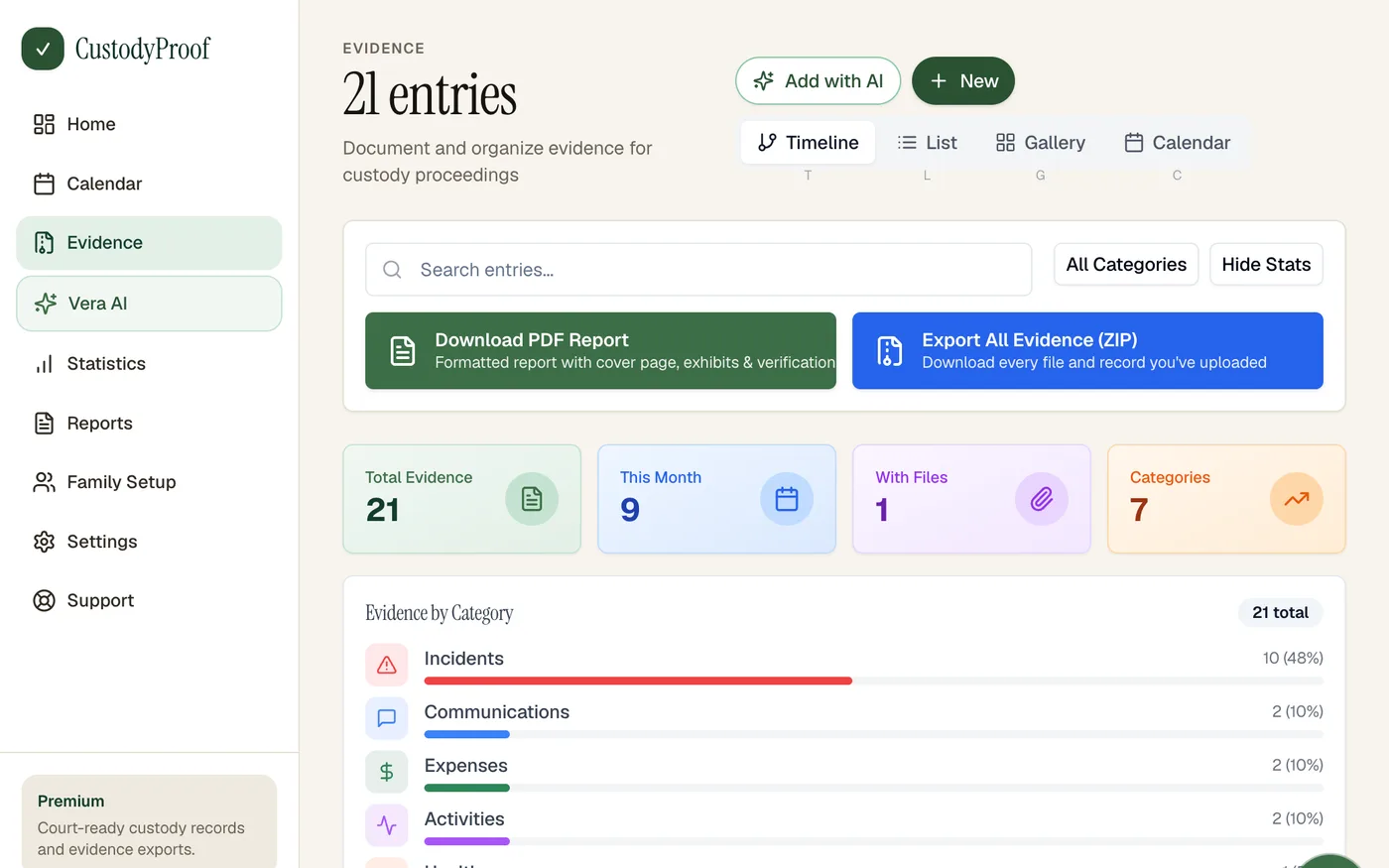
One vault, seven categories, tied to the day
Store notes, photos, screenshots, and documents in the encrypted evidence vault and keep each one tied to the calendar entry or incident it belongs to. Seven categories keep communications, incidents, expenses, and orders apart, and you choose if and when anything is exported.
If you already keep a binder, the custody binder guide explains how the paper version and the vault fit together.
Find an entry without scrolling a year of texts
Set your schedule once, log what happens on the day it happens, and filter the timeline by date, category, or child when someone asks. The entry and its files come up together.
1. Set your schedule once
Type your custody arrangement in plain words — or upload the agreement itself — and your full recurring calendar builds itself, including summer possession and holiday blocks. You review every date before anything saves.
2. Log life as it happens
When the week went as planned, confirm it with one tap. When it didn’t — a denied exchange, a late drop-off, an unpaid expense — that difference becomes a dated record with the evidence attached, captured while it’s fresh.
3. Walk in prepared
One click produces a lawyer-ready PDF: custody percentages, your planned schedule versus what actually happened, the violation timeline, and the expense ledger. Organized proof instead of a shoebox of screenshots.
Everything the vault can hold, and what sits beside it
Evidence is one part of the record. Custody time, violation flags, and child expenses carry their own dates on the same private account.
Custody time, counted correctly
Overnights are counted as nights and timed day visits are tracked separately in hours — so your parenting-time percentages are numbers you can stand behind.
Your agreement becomes your calendar
Alternating weekends, 2-2-3 rotations, summer possession, holiday carve-outs — describe it once and the schedule fills itself in a year ahead.
Planned vs. actual, side by side
CustodyProof compares what was supposed to happen with what did. Confirm days as you go and build a “Confirmed through” record that shows your documentation was kept in real time — not reconstructed for court.
Violations with time stamps
Denied visitation, late exchanges, no-shows — logged with dates and details, so isolated incidents become a documented pattern.
An encrypted evidence vault
Screenshots, photos, voice notes, and documents stored encrypted and tied to the incidents they prove — searchable when you need them, private always.
Every dollar, every receipt
Log child expenses with the receipt attached and keep a running ledger of what you’re owed — so “I’ll pay you back” finally has a paper trail.
Statistics that answer the hard questions
How many overnights? What percentage? How often were exchanges missed? Your dashboard knows — precisely, and on demand.
Lawyer-ready reports
Clean PDF reports, evidence archives, and expense summaries your attorney can actually use — which means less billable time spent untangling your records.
Export a packet without rebuilding the folder
The Court Packet pulls your entries, flags, and attached files into one PDF: a plain-English summary, color-coded calendars, and a chronological journal. Which exports exist and what each contains is covered in reports and exports. Whether a court accepts any of it is a question for your attorney.
The story first
A narrative summary and hero stats a judge can absorb in thirty seconds.
Deviations in red
Missed and extra nights marked on the calendar and listed by date — red only ever means something.
Court language
Evidence grouped under the best-interests factors courts actually evaluate, with a sworn verification page.
Download the sample Court Packet (PDF) — fictional family, real report, generated by the same engine your records would use.
Snap the screenshot; Vero files the entry
On Case Builder, Vero reads a screenshot of a text thread, a photo of a receipt, or a voice note and drafts the entry with the file attached. You review every draft before it saves. Vero does not guess dates, and voice audio is not stored. (Vero AI is included in Case Builder, or add it anytime.)
Speak it
Record a voice note right after the exchange. Vero transcribes it and drafts the dated incident for you.
Snap it
Screenshot the text thread or snap the receipt — Vero reads it and files the record or expense with the evidence attached.
Paste it
Paste months of old notes or message threads and Vero sorts them into custody time and incidents — your backlog, finally organized.
You approve every record before it's saved. Unknown dates are never guessed.
Two plans. Private storage on both.
Documentation from $14.75/month or $144/year, or Case Builder with Vero AI from $29/month — cancel anytime, backed by a 30-day money-back guarantee.
Works in ChatGPT: ask for your parenting-time percentage, add entries and pull reports from a chat. See how it works
Questions about keeping evidence
What kinds of files can I store?
Photos, screenshots, PDFs, and other documents, up to 25 MB per file. Files are encrypted before they are stored and attached to the entry they support.
Who can see my files?
Only you, signed in to your own account. Nothing is shared with the other parent, and nothing leaves the vault unless you export it.
I have months of screenshots already. Do I have to re-enter everything?
No. Upload what you have with the real dates, and start fresh from tonight for everything new. On Case Builder, Vero can turn pasted threads and screenshots into dated drafts you review before saving.
How do I hand evidence to my attorney?
Export it. The evidence export and the Court Packet are files you download and share however you choose; Custody Proof never sends anything on your behalf.
How does the money-back guarantee work?
Your first charge is covered by a 30-day money-back guarantee. If Custody Proof isn’t right for you, request a refund in seconds right from Settings while your window is open, or email support if you prefer. Full refund, and any reports you exported are yours to keep. You can also cancel anytime from Settings, and canceling does not delete your records.
Private storage, your sharing choice
Files are encrypted before they are stored and visible only to your login. The other parent is never invited, never notified, and never given a view. When you want your attorney to see something, you export it and hand it over yourself.
- Private & encrypted
- No cooperation required
- Cancel anytime
- 30-day money-back guarantee