How to track child expenses when your co-parent won't cooperate
By EJ Archuleta, Licensed attorney · Updated
To track child expenses with a co-parent who ignores you, keep your own dated ledger. Give each cost one row with the date, amount, category, child, and receipt. The row also records the share your order assigns, when you asked to be reimbursed, and what you actually received. Send each request by a method that leaves its own record. Keep a running balance that shows partial payments and disputes separately. That ledger works whether or not the other parent ever opens an app.
Most expense tools assume both parents log in, approve, and pay through the same system. That breaks the first time one parent stops answering. This page covers the other situation: you pay, you ask, nothing comes back, and you still need a record you can hand your attorney.
This is general information, not legal advice. What is shared, in what proportion, and what counts as notice depend on your order and your state. Ask a family law attorney about your case.
Start with your order, not your receipts
Before you log anything, read the expense section of your order or agreement. Then write down the answers in plain words.
- Which costs are shared. Child support is generally meant to cover many routine costs. Out-of-pocket extras are often split separately. Common examples are uninsured medical bills, childcare, school costs, and activities.
- The split. It might be equal, a set percentage, or a fixed amount. Use the number your order states. Do not use a guess or a number from a friend's case.
- Pre-approval rules. Some orders require the other parent's consent before certain costs, such as a new activity or elective treatment. Some also say how that consent must be asked for.
- Notice and payment deadlines. Some states set a window for sending an itemized request and a window for paying it. Those windows differ by state, and an order can set its own..
- How notice must be given. It might be email, mail, or a specific platform.
If the order is silent or unclear on any of these, take that question to your attorney before you build a balance on top of it.
What belongs in the ledger
Log a cost when it is about the child and you may need to show it again:
- Medical and health: copays, prescriptions, dental, therapy, the uncovered part of a bill.
- Childcare: daycare, after-school care, summer camp used as care.
- Education: fees, supplies, tutoring, field trips.
- Activities: registration, uniforms, equipment, lessons.
- Transportation tied to exchanges, clothing and daily needs, and direct payments made under the order.
Leave out rent, your own groceries, and the lunch you bought yourself after the appointment. A ledger padded with household spending is easier to attack. If a receipt is mixed, log only the child's portion and say so in the description.
Capture it the day you pay
A photo sitting in your camera roll is raw material. A ledger row with the date, amount, and receipt attached is a record. Make the row while you are still in the pharmacy parking lot. If you wait for a weekend catch-up session, the receipt is often gone by then.
Each row should hold:
- Date incurred. This is the date of the visit or purchase, not the day you found the email.
- Total amount and what it was for, such as "prescription copay" or "spring soccer registration."
- Category and vendor or provider.
- Which child. This is a label. It does not divide the dollars.
- Receipt and proof of payment. Court forms in some states ask for the provider's bill, proof of what you paid (such as a card receipt or canceled check), and insurance paperwork if the bill was partly covered.. Keep all three when you can.
- Shared? If yes, record the share and the provision in the order that makes it shared.
- Insurance paid, out-of-pocket amount, date paid.
Document the request, even if no one answers
Here is the problem one-sided tools have to solve. If the other parent never opens an app, an in-app request proves little. What you need is proof that you asked, what you asked for, and when.
Send each request outside any shared platform, by whatever method your order specifies. Email is usually the easiest to prove later. Some parents also use certified mail for larger amounts. A useful request contains:
- an itemized list of the expenses, with dates and amounts,
- the share you are asking for and the order provision it comes from,
- copies of receipts and proof of payment,
- how payment can be made, and by when, if your order sets a deadline.
Keep it short and factual. "Attached are three receipts from March totaling $X. Under section [number] of our order, your share is $Y." Do not argue, threaten, or bring up parenting time.
Then record the request in the ledger. Note the date you sent it, and save a dated screenshot or PDF of the sent message. An unanswered email does not prove the other parent agreed. It does show that you gave notice and when. How a court treats silence is a question for your attorney.
Running balance, partial payments, and "I'll pay you back"
A text that says "I'll pay you back" is a promise, not a balance. A balance is your shared spending, minus the other parent's share, minus what you have actually received. Give each row a status: not requested, unpaid, partially paid, paid, or disputed.
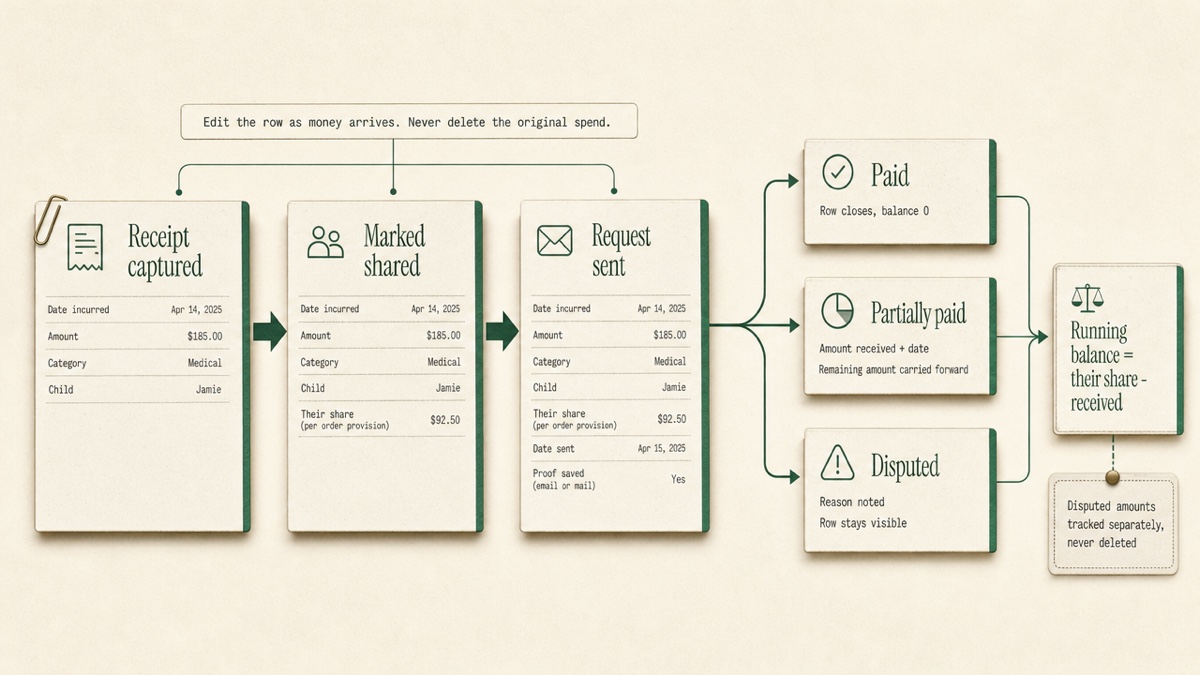
When money comes in, edit the row to show the amount received and the date. Do not delete the original expense to tidy things up, because deleting also removes the receipt. Fix typos by editing. Delete a row only if it never should have existed.
Partial payments are common in high-conflict cases. Someone pays $40 of a $120 share and calls it settled. If the payment is recorded against the right row, the remaining $80 stays visible. You also avoid the argument later about which bill the $40 was for.
When an expense is disputed
Disputes usually come in four forms: the cost wasn't approved, it isn't covered by the order, the amount is wrong, or the bill never arrived. For each one:
- Mark the row disputed and write down the stated reason, word for word if it came in writing.
- Save the objection itself, as a screenshot or PDF of the message.
- Keep disputed amounts separate from undisputed ones. "$600 undisputed and unpaid, $150 disputed" is a clearer picture than "$750 owed."
Don't stop paying your own undisputed obligations because of a disagreement. In at least one state, a parent who disputes a reimbursement request must pay first and then ask the court for relief.. If you are the one disputing an expense, ask your attorney before you withhold anything.
When money becomes control
Some nonpayment is disorganization. Some of it is a pattern. Watch for these signs:
- chronic nonpayment that forces you to carry every shared cost,
- making payment depend on concessions, such as "I'll pay if I get an extra weekend,"
- demands for access to your bank accounts or passwords,
- refusing to approve needed care, then objecting to the bill.
Document these signs the same way you document expenses: the date, the exact words, and a saved copy. Keep that record somewhere the other parent cannot see. If the pattern is part of broader control or abuse, raise it with your attorney, and consider contacting a domestic violence advocate. The ledger is evidence of a pattern. It is not a plan for your safety.
Taxes are a separate question
Questions like who claims the child, who can take a childcare credit, and whether it matters who actually paid have their own rules. Those rules don't always follow the custody order.. Your ledger shows who paid what and when, which is useful to bring to a tax professional. Let that person answer the tax question.
Moving from a spreadsheet
If your history lives in a spreadsheet, you don't need to start over. Clean it up first:
- Use one row per expense.
- Use real dates, not "sometime in March."
- Put each piece of information in its own column: amount, category, child, and whether the cost is shared.
Add the receipt images afterward, matched to their rows. Enter the larger and older items first, because those are the ones most likely to be challenged.
Exporting for your attorney
Export a filtered slice, not everything you've ever logged. Examples:
- medical expenses this year, shared costs only,
- activities over the last three months,
- one child, all time.
A useful expense packet contains:
- summary totals,
- a breakdown by category,
- the detailed ledger,
- receipts labeled as exhibits, so no one has to match a file named IMG_4022 to a line item.
Some attorneys also want a spreadsheet they can sort. Organized records mean your attorney spends less time sorting receipts. That matters when you pay by the hour, which is covered in more detail on attorney fees.
Doing this in Custody Proof
The expense ledger is included on every plan, starting with Documentation at $14.75/month. It is private to you. The other parent is never invited and never notified. No money moves through it.
- Logging an expense. Record the amount, what it was for, and the date incurred. Categories include Medical & Health, Childcare, School & Education, Extracurricular, Transportation & Exchanges, Clothing & Daily Needs, Direct Payments, and Other. You can tag one or more children. Receipts can be images or PDFs, up to 25 MB each, with more than one per expense.
- Shared costs. Turn on "the other parent owes a share" only when your order says so. Choose 50/50, a custom percentage, or an exact amount, and the form shows "They owe $X" as you type. Optional fields cover the vendor, date paid, insurance paid, out-of-pocket amount, and the order provision.
- Status and payments. Each row carries one of five statuses: Not requested, Unpaid, Partially paid, Paid, or Disputed. Edit a row to record an amount received and when notice was sent. Summary cards show Total spent, Balance due, Reimbursable, the other parent's share, and Received.
- Saving your requests. Store a screenshot of a sent request in the evidence vault's Communications category, with its date.
- Importing a spreadsheet. Upload a CSV in the expected format. If your file is in another format, a ready-made ChatGPT or Claude prompt converts it. You review every row before anything saves, and likely duplicates start unchecked.
- Receipt reading (Case Builder). On Case Builder, Vero reads a receipt photo and fills in a draft for you to review.
- Exports. Export a court-ready PDF, with image receipts embedded as exhibits E-1, E-2, and so on, or a CSV. Both include exactly what your filters show.
For walkthroughs, see Tracking expenses and Reports and exports.
Start your expense ledger. You are charged at signup, you can cancel anytime, and the first charge carries a 30-day money-back guarantee.
Frequently asked questions
Will the other parent know I'm tracking expenses?
No. Custody Proof is used by one parent. There is no shared account, invitation, or notification. If you want to share the ledger, you export a file and hand it over yourself.
Can Custody Proof send the reimbursement request or collect the money?
No. It records what you spent, what you requested, and what you received. You send requests yourself, by the method your order requires, and then log the date you sent them.
What if the other parent says they never got my request?
That is why you send requests by a method that leaves its own proof, such as email or certified mail, and save a dated copy. Whether that satisfies your order's notice rules is a question for your attorney.
Does marking an expense "reimbursable" mean they owe it?
No. The flag records your reading of the order and calculates a share. It is not a finding that the money is owed. If you are unsure whether a cost is covered, log it as a fact and ask your attorney before you mark it shared.
I have a year of receipts and a messy spreadsheet. Is it too late?
No. Import the rows, then attach the receipts afterward. Start with the largest and oldest items, and use their real dates.
Keep reading
- How to Choose a Co-Parenting App: Shared or Private?
- Co-Parent Not Following Custody Schedule? What to Do
- Private Custody Calendar App
- Which custody app fits your situation
Custody Proof is a documentation tool, not a law firm. Nothing on this page is legal advice. Whether and how a record is used in a case is a question for your attorney.