How to choose a co-parenting app: a shared channel or a private record
By EJ Archuleta, Licensed attorney · Updated
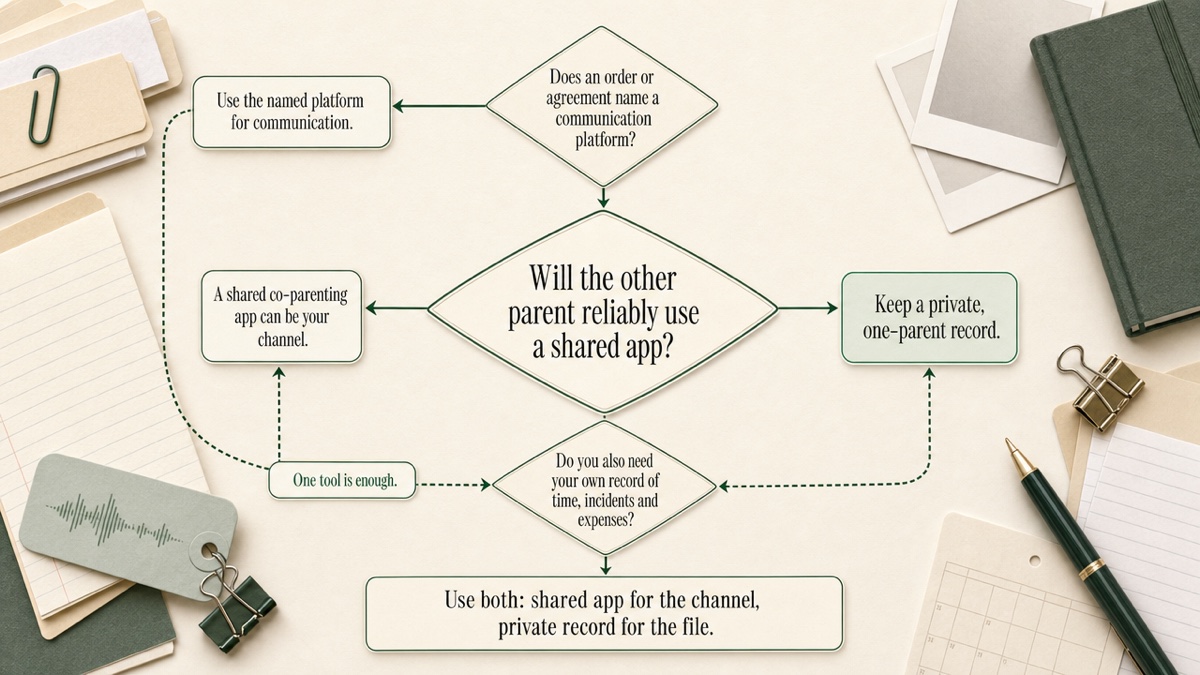
To choose a co-parenting app, start with one question: will both parents actually use it? If you will both use it, and the problem is how you communicate, choose a shared co-parenting app, built around a locked message thread and a calendar you both see. If the other parent won't join, won't answer, or uses every shared space as a new place to fight, you need a private record that works without them. That is a different kind of tool.
Most guides skip that question and assume the answer is a shared app. That is how parents end up paying for an app the other parent never opens. This page covers the participation question first. Then it gives a checklist that applies to both kinds of tool, and explains how to run both if you need both. Custody Proof is a one-parent documentation app, so we say plainly where it fits and where it doesn't.
This is general information, not legal advice. Take questions about your own case to a family law attorney licensed in your state.
Question one: will both parents use it?
A shared app depends on the second account. Its strengths are a thread neither parent can quietly rewrite, a calendar you both see, and expense requests you both answer. Every one of those depends on the other parent logging in.
Be honest about which of these describes you:
- Both of you will use it, or a judge, mediator or attorney has told you to. That points to a shared app.
- They'll join in name only. They sign up, read selectively and answer when it suits them. A shared log can still show slow responses. But the calendar, the expense requests and the swap approvals stay half-filled, and you still have no file of your own.
- They won't join, or you don't want them alerted that you're keeping notes. That points to a private record.
One distinction matters before you compare features. A court order to use a specific platform governs how you talk to each other. It is not automatically your evidence file. Plenty of parents need both.
When a shared co-parenting app is the right tool
Choose a shared app when the problem is the channel:
- Both of you have been told to put parenting communication in one documented place.
- You need a message history neither of you can edit later. On dedicated platforms, messages and events are typically timestamped once posted and can't be edited or deleted afterward.
- You want schedule-change requests and shared expenses settled where both sides see the same numbers.
- You want a parenting coordinator, therapist or attorney looking at the thread you both used, instead of forwarded screenshots.
Features vary across shared apps. Common ones include tone checkers that flag heated language before it's sent and read receipts. Some offer exchange check-ins, which may log arrival times or use GPS. Many let you grant view access to professionals. Some courts recommend or require particular platforms.. If your order names one, use that one. Nothing on this page, and no private tool, replaces it.
When a private record is the right tool
Choose a private record when the problem is the file, and especially when shared participation is what already failed:
- The other parent won't join, won't respond, or uses the app as another venue for conflict.
- You need a file they can't see, comment on or refuse to fill in.
- You need overnight counts and planned-vs-actual comparisons, not a chat history.
- You're paying an attorney by the hour to rebuild a timeline from your camera roll.
Custody Proof is built for this. One parent subscribes. The other parent is never invited and never notified. You log custody time, flag incidents on your own calendar, keep files in an encrypted evidence vault, track child expenses, and export reports when you choose.
It is not a workaround for a communication order, and it is not a hidden inbox for messaging the other parent. Think of it as a notebook with structure. For the longer argument about why shared tools break down in high-conflict cases, see why co-parenting apps fail.
The checklist: what to check in any custody or co-parenting app
Timestamps: what exactly gets stamped
Every app claims timestamps. The useful question is what they're attached to. Shared apps stamp communication: who said what, and when. A documentation tool stamps your record: nights, visits, incidents, files and expenses.
If your dispute is about who said what, the communication log is the relevant record. If it's about who had the children, who missed the exchange and what was spent, you need the documentation record.
Edits and corrections
Locked messages are a strength in a shared thread. A personal record needs something different, because you will mistype a date and need to fix it. Ask what the tool allows and what the record shows about your review.
Custody Proof is your own notebook, not a locked message log. You can edit entries. When you review planned-vs-actual differences, the app never offers to remove a day you flagged as a violation. You can confirm the calendar as accurate through a date, and reports cite that "Confirmed through" date. Deleting an expense removes its receipts permanently and asks you to confirm first, so editing is usually the better fix.
Security and encryption
HTTPS is the minimum. Ask how uploaded files are stored and who can open them. In Custody Proof:
- Evidence files and receipts are encrypted with AES-256 before storage, in private storage tied to your account.
- Card numbers are handled by Stripe.
- Analytics count feature usage, never the content of your notes.
- Vero's voice audio and transcripts are never stored.
Details are in your account, data, and privacy.
Who can see it, and who gets notified
This is the question to press hardest. Find out what the other parent sees or hears about when you:
- join
- upload a file
- write a "private" journal entry
- grant a professional access
A private journal inside a shared account is still inside a shared account. Read the settings before you write anything sensitive there.
In Custody Proof, the other parent never has an account, gets no invitation and receives no notifications. Flagging a violation alerts no one. If a record leaves your account, it's because you exported it and handed it over.
Schedule complexity
Parenting time can be a weekend, a week or a whole summer. Orders also add alternating holidays, dates "to be designated," and notice deadlines like "designate in writing by April 1."
Test a tool against your actual order, not a sample one. Custody Proof builds a recurring calendar from your uploaded agreement (PDF or Word) or a plain-words description. It handles biweekly and monthly rotations, odd- and even-year holidays, and open blocks. You approve it week by week before anything saves. Notice deadlines become in-app reminders.
Overnights vs. visits, and planned vs. actual
Most comparisons skip this, and it's often what a modification or support conversation turns on.
Ask whether the tool counts overnights or calendar days. Custody Proof counts nights, the way family courts commonly do, so Friday after school to Sunday evening is 2 nights. How your own order counts time is a question for your attorney.
Ask whether daytime visits are kept out of the overnight percentage. In Custody Proof they are tracked separately, as a count of visits and total hours.
Ask whether the tool compares the schedule to what happened. Custody Proof shows planned against actual day by day, with missed and extra time listed. Per-child totals appear on reports as clearly labeled child-nights, so nothing looks inflated. Because the record is one-sided, your percentage and the other parent's won't add to 100%. Days you didn't log aren't assigned to anyone.
Expense tracking
Shared apps usually run expenses as a request-and-approve flow both parents see, and some move money. Custody Proof keeps a one-parent ledger instead. No money moves through it. Each expense can have its receipt attached and a share you set (50/50, a custom percent or an exact amount). Each row carries a status: not requested, unpaid, partially paid, paid or disputed. The PDF export embeds image receipts as labeled exhibits.
Getting files to your attorney
Many shared apps offer professional view access. Custody Proof has no attorney portal. Your attorney gets the files you export:
- a one-page stats summary
- a detailed PDF report, with optional planned vs. actual
- an expense report
- an evidence report
- a CSV
- a ZIP of every original attachment
- the Court Packet, which binds a plain-English summary, color-coded calendars, flagged deviations and the full journal into one PDF
Ask your attorney which they want. Whatever app you use, ask what the export actually contains: a formatted PDF, original files or raw data. Reports and exports shows a sensible packet order.
What happens when you leave
Ask every vendor what happens to your records if you stop paying or switch apps. Here is how Custody Proof handles it:
- Exporting: you can export your data from Reports at any time.
- Canceling: you keep access through the period you paid for, and your records are not deleted. If a payment had already failed, access ends immediately.
- Deleting: this is a separate, permanent request to support.
- Switching in: if you're coming from another app, you can import its .ics calendar export and review every entry before it saves.
Be careful with "court-admissible"
No app makes evidence admissible. Each state has its own evidence rules. Phone screenshots of text messages are often admitted, but someone usually has to vouch for them, and the other side can challenge them as incomplete or altered.. Shared platforms have standing partly because their messages are locked once sent and courts are familiar with them.
Custody Proof promises organization: records that are dated, filtered and labeled. It does not promise that a judge will accept a PDF. Whether a record can be used, and how it would be authenticated, are questions for your attorney. Anyone selling software as the way to win custody is selling a story.
How to compare cost
Compare what you'll actually pay, not the headline price.
Shared apps. These are often priced per parent and by feature tier, so a shared app may mean two subscriptions. Some paid platforms offer fee waivers for parents who can't afford them. Ask about those. Check each product's live pricing rather than a comparison chart.
Custody Proof. One parent pays one subscription, charged at signup with no trial:
- Documentation: $14.75/month or $144/year.
- Case Builder: $29/month or $278/year. It adds Vero, the AI assistant that turns voice notes, pasted texts and photos into drafts you review, plus exhibit reports and priority support. You can move up to it later in one click.
Your first charge has a 30-day money-back guarantee. See plans and billing.
The cost that matters most may not appear on either price list. It is the attorney hours spent reconstructing a timeline that should already exist.
Running a shared app and a private record together
A common split:
- The shared app (whichever one your order or agreement names) is the channel you use with the other parent.
- Custody Proof is your private file of time, incidents, expenses and attachments. It doesn't depend on their participation.
Three habits keep the two from doubling your work or contradicting each other:
- Don't retype conversations. When a message bears on an incident, save it from the shared app as a screenshot or export. Attach it to the dated incident in your vault's Communications category.
- Log custody time in one place. If a swap is agreed in the shared thread, record in your calendar what actually happened, not what was proposed.
- Keep the facts identical. If the thread says the pickup happened at 6:40, your incident says 6:40. A record that disagrees with the shared log hurts you more than having no record.
The short version
If the failure is communication and both of you will, or must, use one documented thread, pick a shared app. If the failure is documentation and you need a record that works without the other parent, pick a one-parent tool. If you have both problems, use both.
When you're ready to keep your own file, start a private record with Custody Proof.
Frequently asked questions
Will the other parent know I'm using Custody Proof?
No. There is no shared account, no invitation and no notification. Nothing you log is sent to them. A record only leaves your account when you export a file yourself.
Can Custody Proof replace a court-ordered co-parenting app?
No. It has no messaging with the other parent and isn't a communication tool. If an order names a platform, use it for communication. Keep Custody Proof alongside it as your private record.
Can my attorney log in to see my records?
There is no attorney portal. You export PDFs, CSVs or a ZIP of original files and send them to your attorney. You decide what goes and when.
Are Custody Proof reports court-admissible?
We don't make that claim. Reports are built to be clear: timestamps, tables, labeled exhibits and an optional planned-vs-actual section. Whether a court will accept them depends on your state's rules and your case. Ask your attorney.
What's the best co-parenting app for a high-conflict case?
It depends on whether the other parent will reliably participate. If they will, or must, a shared app with locked messages can serve as your channel. If they won't, a shared app can't give you a reliable record. A private one can, and many high-conflict parents keep both.
Is there a phone app?
Custody Proof is a web app that works in a mobile browser. You can add it to your home screen for an app-like icon.
Keep reading
- Co-Parent Not Following Custody Schedule? What to Do
- Private Custody Calendar App
- Parallel Parenting in High-Conflict Cases
- Which custody app fits your situation
Custody Proof is a documentation tool, not a law firm. Nothing on this page is legal advice. Whether and how a record is used in a case is a question for your attorney.