How to prepare evidence for custody court that a judge can follow
By EJ Archuleta, Licensed attorney · Updated
To prepare evidence for custody court, collect the facts that bear on what the judge has to decide. Put each one on a dated record with its proof attached, and organize the whole thing so a stranger can follow it in minutes. Then sit down with your attorney and decide which pieces become exhibits, in what form, and by when they have to be shared with the other side.

Most parents in a custody dispute already have evidence. It is spread across a camera roll, months of texts, a notes app opened at midnight, and an email from school about a pickup that never happened. The problem is rarely having nothing. The problem is that none of it can be read quickly by someone who was not there. Your attorney is that someone, and so is the judge.
This page is general information, not legal advice. Evidence rules, deadlines, and what a court will accept vary by state, by court, and by judge. Bring questions about your case to your own family law attorney.
What counts as evidence in a custody hearing
Evidence usually reaches a judge in two forms:
- Testimony: people speaking to the court. That includes you, and sometimes teachers, child care providers, doctors, or police officers.
- Exhibits: items the judge looks at, such as messages, photos, documents, and records.
Every piece should connect to a point you need to prove. Several pieces pointing at the same fact are more convincing than your word alone.
Records you keep yourself
These include your parenting-time log, your incident notes, your expense ledger with receipts, and the screenshots you saved. They carry the most weight when they were written as events happened. They also need to be consistent from one entry to the next.
Records other people keep
These include report cards, attendance and tardy records, school emails, pediatrician and therapist records, day care sign-in sheets, and police reports. Courts often treat a neutral professional, such as a teacher or a day care worker, as more believable than a family member.
Some of these documents may need to be certified copies, meaning the office that keeps them stamps them as authentic. Request them from that office early. Turnaround varies, and the court's deadline for submitting exhibits does not move to fit the records office's schedule. Ask your attorney which records need certification and when to order them..
Messages, photos, and recordings
Many courts will not look at your phone. Texts, emails, photos, and social media posts are usually printed or captured as screenshots. Video and voicemail usually go on a storage device. Your attorney, the court clerk, or the local court's website can tell you the format your judge expects..
Two cautions:
- Recording laws differ by state. Some states require everyone in a conversation to consent before it is recorded. A recording made the wrong way can be excluded, and it can create legal problems of its own. Ask an attorney before you record a conversation, and before you rely on a recording you already made..
- Do not delete anything, including the messages that make you look bad. Destroying or altering messages can hurt your credibility far more than the messages themselves would.
What a usable record actually is
A usable record answers four questions without a speech:
- When did it happen? Give the date, plus the time if it matters.
- What happened, in plain facts? Who was there, what was supposed to happen, and what happened instead.
- What supports it? A screenshot, a photo, a receipt, or a note written that day.
- Does it fit a pattern? The third late exchange means more when the first two are also written down.
"He's always late" is a complaint. "17 late pickups since March, each logged the day it happened, with the text thread attached" is evidence. The events are the same. The second version is something a judge can actually weigh.
Patterns are where documentation earns its keep. One bad exchange can be explained away as a hard day. Twelve exchanges with the same problem, each dated and each with proof attached, is much harder to dismiss. A log kept week by week also reads differently from a narrative rebuilt the Friday before a hearing. More on that difference in records, not memories.
The five things worth tracking
You do not need a diary of every feeling. You need a small set of facts kept in one place.
1. Parenting time, with overnights and day visits kept separate
Family courts commonly count custody in overnights, meaning the nights the child slept at your home, not the calendar dates involved. A stay from January 1 to January 11 is 10 nights. A weekend from Friday after school to Sunday evening is 2 nights, not 3 days. A Wednesday visit from 3:30 to 7:30 p.m. is real parenting time, but it is not a night. Track visits as a count and a total of hours so your overnight percentage stays clean. How your order counts time is a question for your attorney. The full math is in How courts count parenting time.
2. Exchanges and violations
This covers missed pickups, late returns, denied weekends, and no-shows. For each one, write down the date, what the order said, and what actually occurred. Attach the cancelling text or the timestamped photo to that day, not to a folder named "misc." Whether an event is legally a violation of your order is your attorney's call, so write down what happened and let them label it. A same-day method for these entries is in How to log missed visitation and late pickups.
3. Child expenses and reimbursements
For copays, school shoes, and field trips, record the amount, date, vendor, receipt, and whether the order makes the cost shared. A running balance is more useful than a shoebox of receipts. Expenses also matter outside custody: day care and medical costs often come up when child support is set or modified.
4. Communications you already have
Keep the messages that matter, saved with their dates and filed on the day they belong to. A message is easiest to verify when the screenshot shows the full exchange with its date and sender visible.
5. The quiet weeks
The weeks that went as planned belong in the record too. A calendar that contains only disasters looks like a highlight reel. Confirming the normal weeks is what gives the bad weeks their context.
Planned vs. actual: the denominator
A judge weighing schedule compliance needs two numbers: how often the plan was followed, and how often it was not. Keep two columns for each week:
- Planned: what the order said would happen. For example, Friday 6 p.m. pickup and Sunday 6 p.m. return.
- Actual: what you logged. For example, arrival at 7:40, and the Sunday return happening Monday morning.
The gap between those columns is your evidence. Late, missed, swapped, and extra time only mean something when the plan is on the same page.
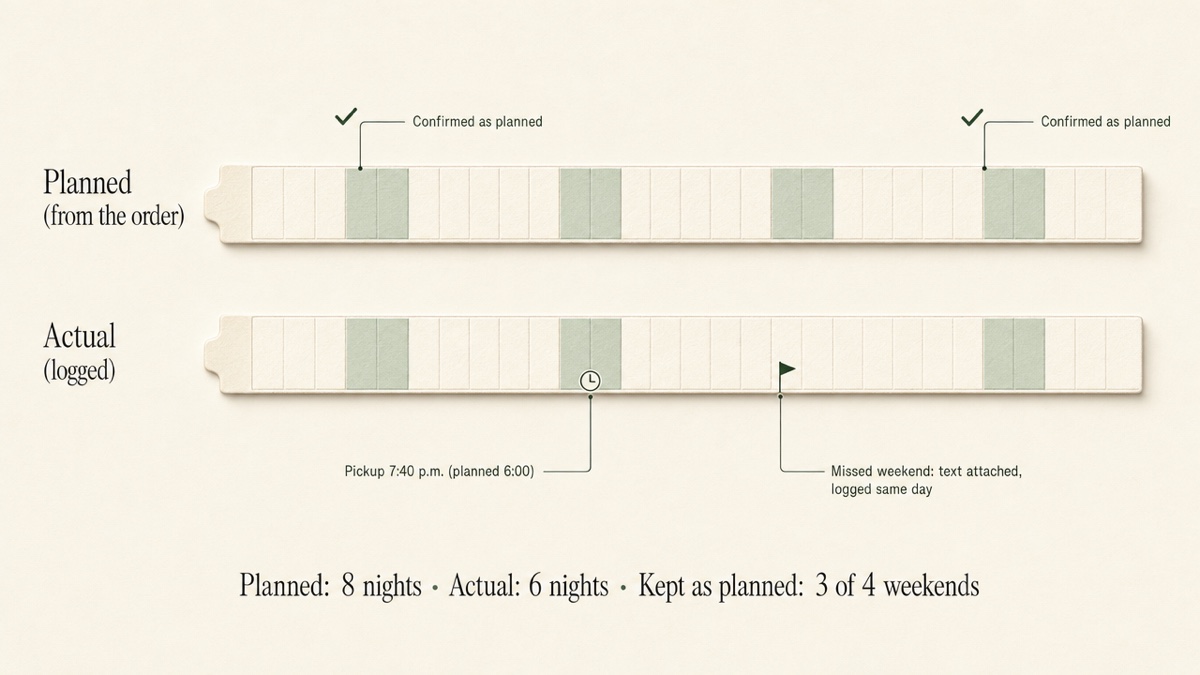
To keep it routine:
- Put the recurring schedule on a calendar once, and check the dates before you rely on them.
- When a week matches the plan, confirm it.
- When a week does not match, log the actual times that day and attach the proof.
- Count nights slept, not days involved.
Connect the record to what the judge actually decides
Custody decisions generally turn on the child's best interests. The factors differ by state, but they commonly include:
- the child's needs and stability
- each parent's involvement in school, health care, and daily care
- each parent's willingness to support the child's relationship with the other parent
- safety, including any history of domestic violence or abuse
Your record should map onto those factors in plain terms:
- Parenting-time totals and school pickup logs speak to involvement.
- Medical appointments you attended, along with the records from them, speak to care.
- A pattern of denied or missed exchanges speaks to whether the schedule is honored.
Your attorney knows which factors your state's courts weigh and which matter in your case. Your job is to make sure the facts behind each one are dated and findable.
Assume the other side will read it
Discovery is the process each side uses to request evidence from the other. Before a hearing, parties are often required to disclose the exhibits and witnesses they plan to use. That means anything you submit, and possibly material you never planned to submit, can end up in front of the other parent and their attorney. Keeping a record private is not the same as keeping it legally protected from a request..
The practical rule is to write every entry as though the other parent's attorney will read it aloud in court. Neutral, factual entries survive that test. Sarcasm, guesses about motive, and venting do not. If you receive a subpoena or a discovery request involving your records, take it to your attorney right away.
Common mistakes that cost credibility
- Emotional language. "She's doing this to destroy me" invites an argument. "Return was scheduled for 6:00 p.m. and occurred at 9:15 p.m." does not.
- Legal conclusions. "This proves he's unfit" is the judge's decision to make. Record facts, not verdicts.
- Exaggeration. "Every single weekend" falls apart the moment the other side produces one weekend that went fine. Precise numbers hold up better than absolutes.
- Gaps. Three months of daily entries followed by silence raises questions. A short, consistent log beats a long, uneven one.
- Cropped screenshots. A message cut off from what came before it looks edited, even when it is not. Capture the full exchange with dates and the sender's name, and keep the original thread.
- Double-counting. One night with two children is one night of custody. Per-child totals belong in a separate column with a clear label.
- Deleting unflattering messages. See above. It can do more damage than the messages themselves.
Preparing to testify from your own chronology
When you take the stand, you may be asked about dates and events from months ago. A chronology you kept as things happened is the best preparation tool you have.
Before the hearing, read it start to finish. Note the three or four patterns that matter most, and practice describing each one in a sentence or two: what the order said, what happened, how often, and where the proof is. Expect to be asked about your own late arrivals or missed calls, and answer them the same factual way.
Whether you can bring notes to the stand, or refer to them while testifying, depends on the court. Ask your attorney rather than assuming. If you are allowed to use notes, the other side may be entitled to see them..
Working with your attorney on what to submit
Ask your attorney what they want before you export anything. Lawyers commonly organize a hearing into a notebook containing:
- what you are asking the court to order
- what you need to prove
- the witness list
- the exhibit list
- the exhibits themselves
Your job is to feed that notebook without becoming your attorney's file clerk.
Questions worth asking:
- Which issues are in dispute, and which records support each one?
- Which school, medical, or police records should we request, and do they need to be certified?
- What is the deadline for submitting exhibits, and how does this judge want them? Paper, electronic, or both, and how many copies? Many court self-help guides suggest three paper copies: one for you, one for the other party, and one for the court..
- Would a one-page summary chart of missed or late exchanges, or of planned vs. actual time, help the judge? Courts often treat a chart like this as a demonstrative exhibit, and your attorney decides whether to use one.
- Is it worth asking the other side to agree in advance that routine records, such as an expense ledger, are authentic? That kind of agreement can shorten a hearing, but it depends on the other side and is not something to plan around..
Then give your attorney a usable set of materials:
- Parenting-time totals for a stated period, with the counting rule shown.
- Planned vs. actual, if the dispute is about who followed the schedule.
- A chronological incident list with attachments.
- An expense ledger with receipts.
- A short cover note saying what period the materials cover and that you kept them as events happened.
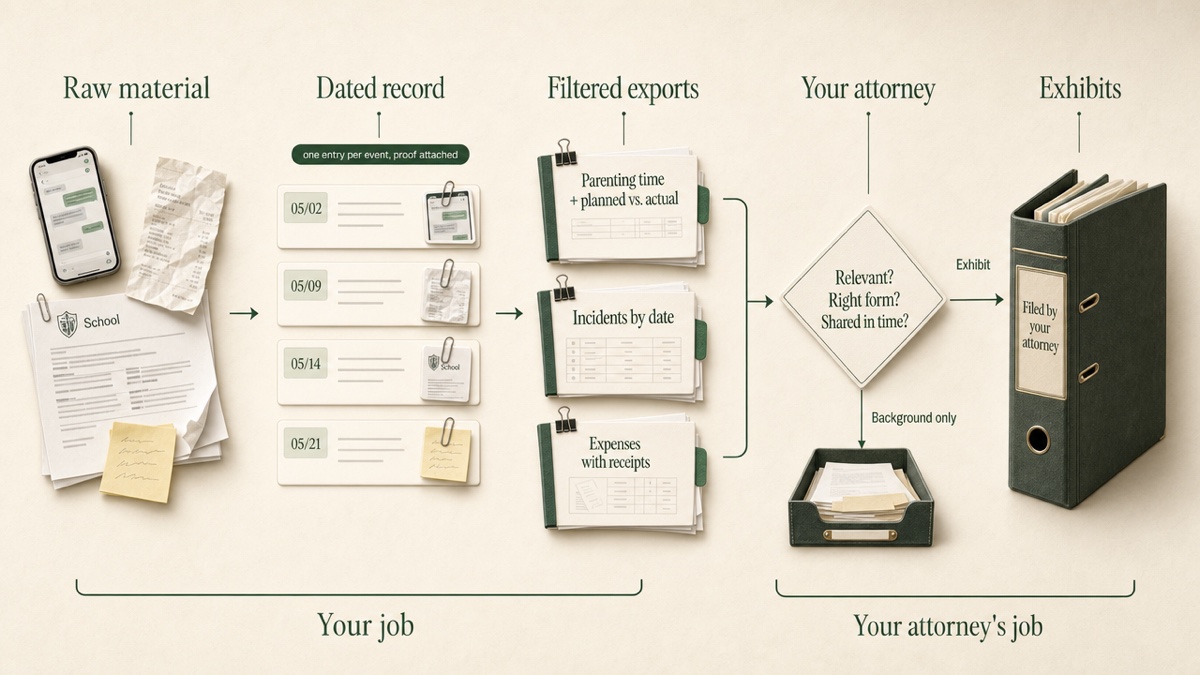
Software cannot make a record admissible. What it can do is make the record organized, dated, and consistent. What gets filed, and how, is your attorney's decision.
If you use Custody Proof for this
Custody Proof is a private, one-parent web app built by a family lawyer. The other parent is never invited, never notified, and cannot see anything you record.
Schedule and parenting time. You can upload your order or describe your schedule in plain words. You review the calendar week by week before anything saves, and unknown dates are never guessed. Overnights and timed visits are counted separately.
Planned vs. actual. The plan-vs-actual view shows deviations, and the "Confirmed through" date records your review of the calendar.
Evidence vault. Files are encrypted (AES-256) and sorted into seven categories, attached to the day they belong to.
Expense ledger. Each expense carries its receipt and a running reimbursement balance.
Exports. You can produce a one-page stats summary, a detailed PDF with optional planned vs. actual, a CSV, an evidence report, an expense report with receipts as labeled exhibits, and a full ZIP of the vault. The suggested order for handing them over is in Reports and exports.
The Court Packet. This binds the pieces into one PDF:
- a plain-English summary
- color-coded calendars with deviations flagged in red
- a chronological journal
- evidence grouped under best-interest factors
- a sworn verification page
The sample Court Packet uses a fictional family and the same engine your records would use. Your attorney receives whatever files you export and hand over.
Plans. Documentation costs $14.75/month or $144/year. Case Builder costs $29/month or $278/year and adds Vero, the AI assistant. Vero turns a voice note, a pasted thread, or a screenshot into a draft you review before it saves, and she never guesses dates. Your first charge has a 30-day money-back guarantee.
Start with one week, not a perfect archive
Pick a start date and put the schedule on a calendar. Log this week's overnights. Log the next exception the day it happens, and attach one piece of proof to it. If you have a backlog, enter the important past events with their real dates. Six months of that habit produces a record someone else can read in minutes.
Frequently asked questions
What evidence do you need for custody court?
That depends on what is in dispute. Common evidence includes:
- parenting-time records
- logs of missed or late exchanges with proof attached
- relevant messages
- school and medical records
- police reports where safety is at issue
- expense records with receipts
Your attorney can tell you which of these matter for the issues in your case.
Can I just show the judge texts on my phone?
Usually not. Many courts expect messages printed or captured as screenshots, and video or audio saved to a storage device. Check your judge's procedures with your attorney or on the local court's website..
Will the other parent see what I submit?
Assume they will. Exhibits are generally shared with the other side, and discovery can reach further than what you plan to submit. Write every entry so it holds up if it is read aloud.
Is a Custody Proof report admissible in court?
No software can promise that. Reports are dated, labeled, and organized, and Custody Proof makes them easy to review. Whether and how they are used is up to your attorney and the court.
I've been saving screenshots for months. Is it too late to organize?
No. Enter the important items with their real dates, attach the proof you already have, and log new events the day they happen from now on. A backlog plus a consistent habit going forward still adds up to a usable record.
Keep reading
- How to Track Child Expenses With an Uncooperative Co-Parent
- How to Choose a Co-Parenting App: Shared or Private?
- Co-Parent Not Following Custody Schedule? What to Do
- Which custody app fits your situation
Custody Proof is a documentation tool, not a law firm. Nothing on this page is legal advice. Whether and how a record is used in a case is a question for your attorney.