A private custody calendar app: track your schedule without sharing it
By EJ Archuleta, Licensed attorney · Updated
A custody calendar app turns your parenting schedule into dated entries: whose night it is, when exchanges happen, and how holidays and summers override the regular rotation. If the other parent won't use a shared one, or you don't want them in your records, you need a private custody calendar that holds the order, records what actually happened, and shows the difference between the two. Most of these apps are shared, so both parents log in, see the same calendar, and send swap requests.
Custody Proof is that kind of calendar. It's built for one parent, and the other parent is never invited or notified. The calendar is the plan. Your log is what happened. The useful part is comparing them.
Shared vs. private custody calendars: who each one suits
A shared calendar works when both parents will use it. Each parent sees changes as they happen, requests trades in the app, and syncs the schedule to their phone. The design depends on two people keeping it current in good faith.
A private calendar suits a different situation:
- The other parent refuses to join a shared app, or joins and then ignores it.
- The case is high-conflict, and every shared entry becomes another argument.
- You need a record for your attorney, not a coordination tool.
- You don't want the other parent to see what you're documenting.
Those are different jobs. A shared calendar shows a schedule that two people negotiate. A private calendar measures whether the schedule was followed. If you're weighing the two, Custody Proof vs. co-parenting apps covers the trade-offs in more detail.
Turning your custody order into a calendar
Typing every exchange into a calendar by hand gets tedious, and mistakes creep in. Custody Proof gives you three ways in:
- Upload the order. Upload your agreement or decree as a PDF or Word file. The schedule is read from the document, and any block that came from the order shows the original wording so you can check it against the source.
- Describe it in plain words. For example: "every other weekend plus Thursday dinners," or "Christmas Dec 26 – Jan 1, odd years."
- Log manually. Tap custody time onto the calendar yourself, one stay or visit at a time.
With the first two options, you review the schedule week by week on a grid before anything is saved. Dates the app can't determine are left blank, not guessed. Step-by-step instructions are in Set up your custody schedule.
If your history already lives in another app or a spreadsheet, you can import a calendar export (.ics) and review every entry before it saves.
Alternating schedules and the anchor week
"Every other weekend" has two possible versions, and only one of them matches your order. Alternating-week, 2-2-3 and biweekly rotations all depend on a starting point: the week the pattern counts from. If that start is off by one week, every weekend for the rest of the year lands on the wrong parent's side, and the calendar will look tidy while being wrong.
Before you save, check the first two or three weeks on the review grid against the order and against a weekend you know happened.
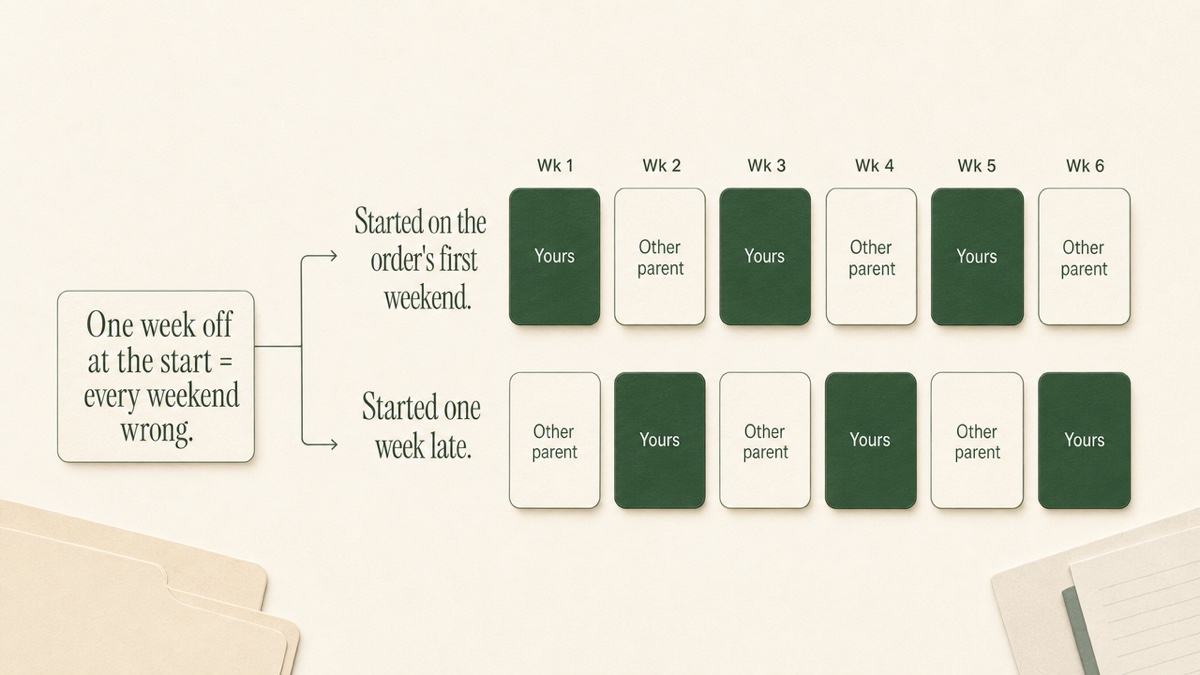
Monthly patterns, such as the first, third and fifth weekends, don't drift this way, but check the months that have a fifth weekend.
Holiday, summer and vacation blocks
Most orders override the regular rotation for holidays, school breaks and summer. Some state parenting plan forms say so directly: the holiday schedule takes priority over the regular weekday and weekend schedule.
In Custody Proof, these overrides are blocks of time attached to your schedule. During a block, the block wins. The calendar, statistics, planned-vs-actual comparisons and reports all follow it. Each block can repeat:
- one time
- every year
- odd years
- even years
That covers orders like "Thanksgiving with me in even years." Holidays whose dates move each year land on the right dates automatically. If your time sits inside the other parent's block, such as one weekend during their summer month, you add both blocks, and your weekend takes priority.
Some orders leave dates open, such as "30 days of summer, dates to be designated." You can save that block without dates, and the app prompts you to fill them in as the period approaches.
Notice deadlines are a separate item. A line like "designate in writing by April 1" goes on the Deadlines & Reminders page. These reminders appear in the app only. Missing one can cost you time the order gives you, so set them once and they come back each year.
Planned vs. actual: why it matters in a dispute
A calendar that only displays the order tells you what was supposed to happen. Disputes are about what did happen. Did the weekends happen? Who kept the extra nights in July? Are pickups now regularly two hours late?
Custody Proof compares the saved schedule with what you actually logged, day by day. Each day falls into one of three groups:
- kept as planned
- missed
- extra
Only days up to today are compared.
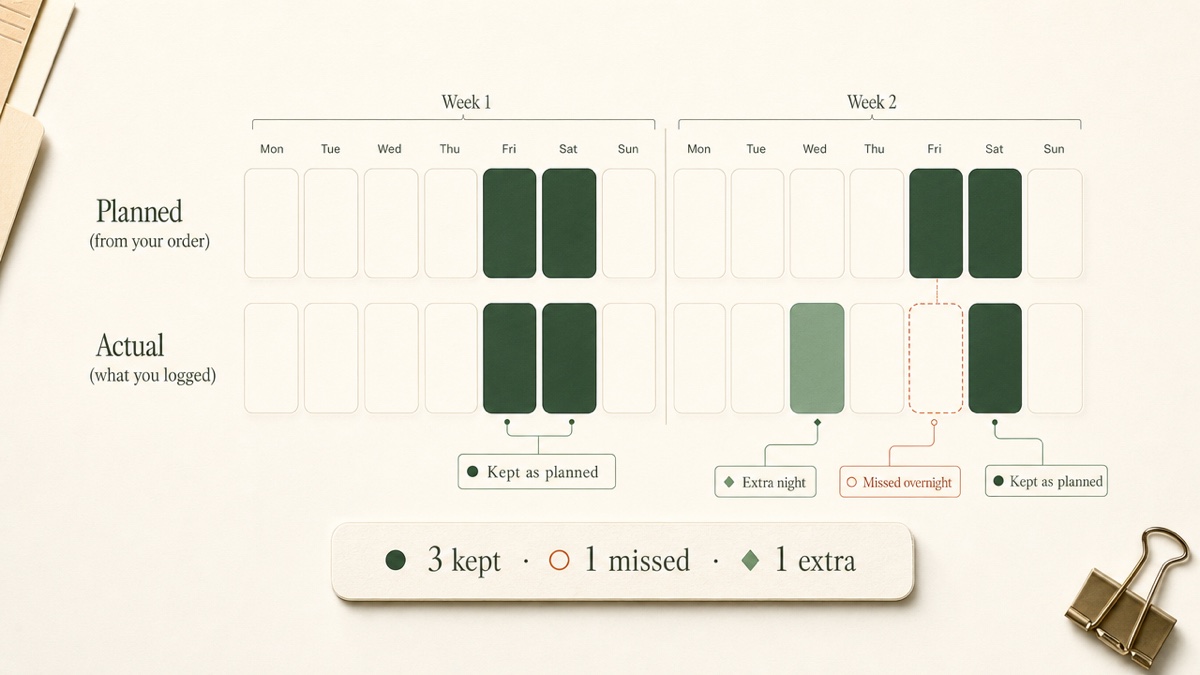
Two things make this more than a chart.
You fix and confirm as you go. When a planned day happened but wasn't logged, one tap logs it. When time was entered by mistake, one tap removes it. When something really did differ, you keep it, because that difference is often the documentation you need. Days you flagged as violations are never offered for removal.
Your reports carry a confirmation date. When the calendar is accurate, you choose "Confirm through yesterday." Reports then cite a "Confirmed through" date next to the numbers. That shows the record was reviewed as it went, not rebuilt from memory before a hearing. A weekly check-in on your Dashboard reminds you to do this.
Confirm the ordinary weeks too, not just the problem ones. A record with only exceptions in it doesn't show how often the schedule worked, so a single missed weekend is hard to put in context.
Overnights vs. timed visits
Custody time is commonly counted in overnights, not calendar days. A Friday-after-school-to-Sunday-evening weekend is two nights. A stay from January 1 to January 11 is ten nights. How courts count parenting time explains why.
A Wednesday dinner from 3:30 to 7:30 is real parenting time, but it isn't a night. Custody Proof records timed visits separately, as a count and a total of hours. They never enter your overnight percentage, so that figure stays a clean count of nights.
A year has 365 nights, and some state parenting plan forms ask how many overnights each parent gets under the plan. Your log counts only what you record, so your percentage and the other parent's won't automatically add to 100%. How actual overnights compare with ordered overnights can come up in modification or support discussions. States differ in how they count parenting time and how much a gap between ordered and actual overnights matters, so ask a family law attorney or your court's self-help center how your jurisdiction counts time.
Logging deviations as they happen
Write it down the day it happens. Notes made at the time are more specific and harder to second-guess than a timeline pieced together months later. For each deviation, record:
- the date, and the scheduled and actual times
- the exchange location
- who was present
- what differed from the order: late, missed, shortened, or swapped
- anything that backs it up, such as a text, an email, a photo or a receipt
On the calendar, you can flag an event as a violation using one of seven preset categories and attach the screenshot or photo. Those notes and files flow into your encrypted evidence vault automatically, so nothing has to be filed twice. On the Case Builder plan, Vero can turn a voice note or a pasted text thread into a dated draft. You review it before it's saved, and she never guesses dates.
If the two of you agreed to a swap by text, save that message with the entry. In many states, parents can agree to occasional schedule swaps, and some parenting plans say such changes should be in writing. A permanent change generally doesn't alter the court order until a court approves it, so the original order remains what a court will enforce. If the swap was never put in writing, say so in your note.
Exporting the record for your attorney
Your attorney doesn't want your whole camera roll. They need something they can read in order and filter by date. From the Reports page you can export:
- a one-page stats summary
- a Detailed PDF, with an optional Planned vs. Actual section
- a CSV of your event data
- the Court Packet, which combines a plain-English summary, color-coded calendars with deviations flagged in red, and a chronological journal
Set the time period and child filter first, so a report covers the months in dispute rather than everything you've ever logged. Whether a court will accept any record, and how it can be used, is a question for your attorney.
This page is general information, not legal advice. Custody law varies by state, so take questions about your order to your own family law attorney.
What a private calendar can't do
A private calendar can't send a trade request, notify the other parent of a change, or show them a shared view. Swaps and notices still go through whatever channel your order requires, such as text or email. Save those messages so your record has them.
A one-sided log is also only as strong as what backs it up. Attach the text, the email or the receipt wherever you can.
Ready to turn your order into a calendar that tracks what actually happens? Start your record. Documentation is $14.75/month or $144/year. Case Builder, which adds Vero, is $29/month or $278/year. Your first charge comes with a 30-day money-back guarantee.
Frequently asked questions
Will the other parent know I'm using a custody calendar app?
No. There's no shared account, no invitation and no notification. If you want to share part of your record, you export a file and hand it over yourself.
Can I send schedule change requests through Custody Proof?
No. It's a one-parent documentation tool, so there is nothing for the other parent to receive. Agree on swaps through the channel your order specifies, then log what actually happened and attach the messages.
What if my order doesn't upload cleanly?
You can describe the schedule in plain words instead, or add blocks by typing them, such as "Summer with me July 1–30." You can also log time manually. Whichever route you take, you review the pattern week by week before anything saves.
Can I add past months, not just future ones?
Yes. You can log past custody time and incidents with their real dates, or import a calendar export (.ics) from another app and review each entry before it saves.
Is there a phone app?
Custody Proof is a web app that works in a mobile browser. You can add it to your home screen so it opens like an app.
Keep reading
- Parallel Parenting in High-Conflict Cases
- How to Prove Parental Alienation in Court: Document Facts
- Custody Lawyer Consultation: What to Bring and Ask
- Which custody app fits your situation
Custody Proof is a documentation tool, not a law firm. Nothing on this page is legal advice. Whether and how a record is used in a case is a question for your attorney.