How to organize a custody binder your attorney can actually use
By EJ Archuleta, Licensed attorney · Updated
To organize a custody binder, follow the order your attorney reads it: the current order first, then a short timeline, then parenting time, incidents, expenses, and communications. Each entry should be dated, written the day it happened, stated as fact, and tied to an original file you keep untouched. Child information such as school, medical, and insurance details goes in a separate folder, because it is reference material and not evidence.
That is the whole structure. The rest of this page explains why each piece is there, from the point of view of the person who has to use the binder: a family lawyer with limited time and your case file open.
This is general information, not legal advice for your case. Custody procedure varies by state and by county, so take specific questions to your own attorney.
What the binder is for
A binder is not a scrapbook of everything that went wrong. It is a working file. Your attorney will open it with three questions:
- What does the order say?
- What actually happened, and when?
- What can be shown, rather than just claimed?
If the binder answers those questions in that order, your attorney spends billable time on strategy. If it doesn't, they spend it sorting.
Judicial self-help guides make the same point from the court's side. Pick the documents that contain facts the judge needs, then organize and label each one. A thick binder is not a strong binder. A strong binder is one where each page earns its place.
The six sections, in reading order
1. The order
Put the current custody order first. Include any modifications and temporary orders, with the newest on top. Everything else in the binder is measured against this document. A late pickup only means something next to the exchange time the order sets.
Highlight the provisions you expect to rely on: exchange times, holiday rotations, notice requirements, and expense-sharing terms. Note any deadlines the order sets for you, such as dates you must designate in writing. Missing your own deadline can weaken a binder that is otherwise clean.
2. The timeline
Next comes a one- or two-page chronology of the key dates. Include when the order was entered, when problems started, and the significant events since. Use one line per event, with a date and a plain description.
This page is often the most useful one in the binder. It lets your attorney see the shape of the case before reading any detail.
3. Parenting time
This section shows who actually had the children, night by night, against what the order planned. Count overnights, not calendar days. A Friday-to-Sunday weekend is two nights. Keep daytime visits as a separate count with hours, so they don't blur the overnight total. Mark missed and extra time by date.
A summary table at the front of this section works better than a stack of calendar printouts.
4. Incidents
Each incident gets an entry with a date, time, location, the people present, what happened, and what you did. Attach any supporting files: photos, a screenshot, or a witness's written account. Sort the entries chronologically.
5. Expenses
List child-related costs with the receipt attached. Give the date incurred, the amount, the category, and whether the order makes the cost shared. Add what was requested, when, and what was received. Common groupings include ordinary health care, extraordinary medical costs, extracurricular activities, and child care.
6. Communications
Communications go last. They support the other sections and rarely stand alone. Group messages by the incident or expense they relate to, or by date. A text declining a weekend belongs next to the missed weekend it explains.
More on assembling each piece: How to document custody for court.
Child information is not evidence
Many binder guides fold school contacts, pediatrician details, insurance cards, class schedules, and clothing sizes into the same file as incident logs. Keep them apart.
Child information is reference material. It may be appropriate for both parents to have it. Evidence is your case preparation, and it is for you and your attorney.
Mixing the two causes real problems. If you share a reference folder, you can expose evidence by accident. A pediatrician's phone number does not need to sit next to your notes about a missed medication dose.
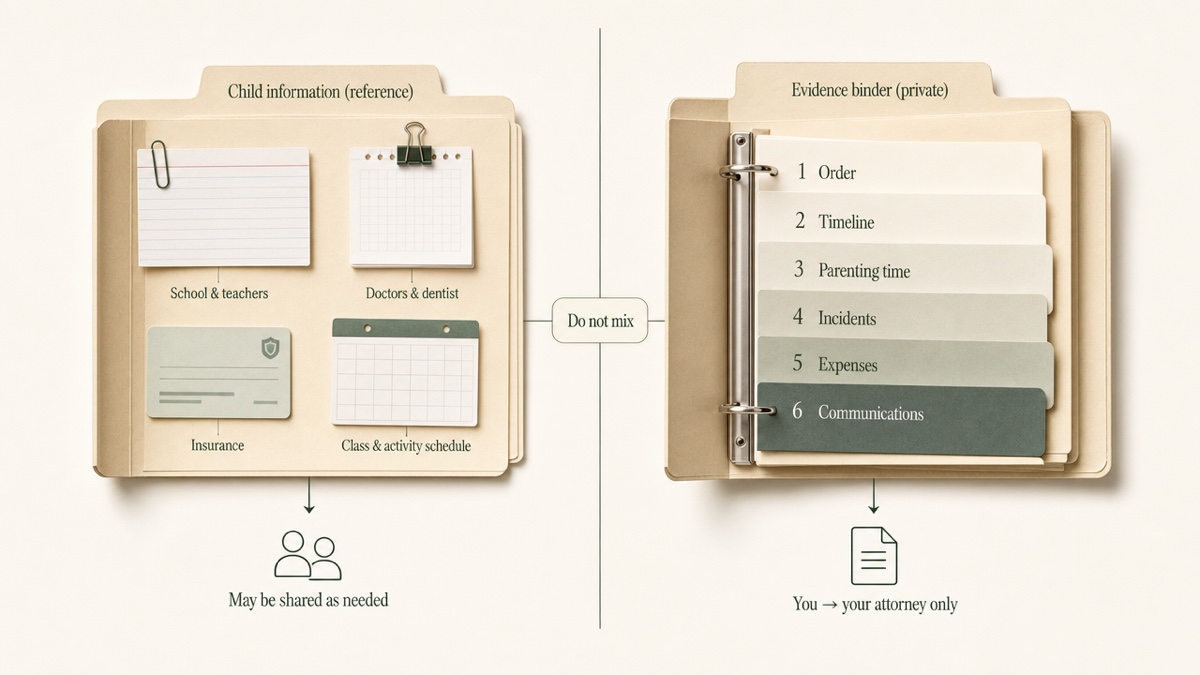
Two practical notes on the reference folder:
- Pull school records directly from the school's parent portal where one exists. Report cards, schedules, behavior reports, and special education records are often available there. You do not have to depend on the other parent for them.
- Redact Social Security numbers and similar identifiers before any copy leaves your hands. Ask your attorney what your court requires for anything filed.
Same-day entries, written as facts
Log it the day it happens
An entry written the same day is more credible and more accurate than one reconstructed weeks later. Memory compresses. Three late pickups become "always late." Times drift. Small details that would have made the entry specific are lost.
Make it a habit: log the entry before you go to bed, or in the car before you drive away. If you fall behind, add past events with their real dates. Note that the entry was written later rather than pretending otherwise.
Facts, not conclusions
Compare two versions of the same event:
- Conclusion: "She doesn't care about the kids' schedule and did it again to punish me."
- Fact: "Saturday, March 14. Exchange set for 10:00 a.m. at the school lot. Arrived 11:35 a.m. No message before 11:20 a.m. Both children waited in my car."
The second version is shorter, checkable, and harder to dismiss. Leave the interpretation to your attorney. If something matters to you emotionally, the record will carry it better as a detail than as an adjective.
Who you are writing to
Some family lawyers advise keeping the parenting log as a separate document that records only parenting time, with nothing else in it. Some also advise addressing it to your attorney. A log prepared at your lawyer's direction may get more protection than a personal diary, which the other side may be able to obtain. That protection is not guaranteed, and it can be lost if you rely on the log in court. Ask your attorney early how they want your log written and labeled. The answer affects what you put in it.
Originals, copies, and file names
Keep the original untouched
Every printout or PDF is a copy. Keep the original file where it came from, unedited: the photo on your phone, the email in your inbox, the voicemail. Back each one up somewhere you control. Cropping, filtering, or re-saving can change the file and its embedded details, such as capture date.
One court handbook notes that exhibits the court admits become part of the record and are not returned. That is another reason to keep your own set.
Screenshots are a starting point
Screenshots are the easiest way to save texts, but they don't always meet a court's requirements on their own. Some phones and messaging services can export a full message history. Ask your attorney which format they want before you spend a weekend screenshotting. Save the screenshots anyway; they are better than nothing.
Name files so they sort themselves
Use one naming pattern everywhere:
`2026-03-14_incident_late-exchange-school-lot.jpg` `2026-03-02_expense_dentist-copay.pdf`
Put the date first, in year-month-day order, so files sort chronologically. Follow it with the category and a short description. A file named `IMG_4022` tells your attorney nothing. A dated, labeled file tells them where it goes.
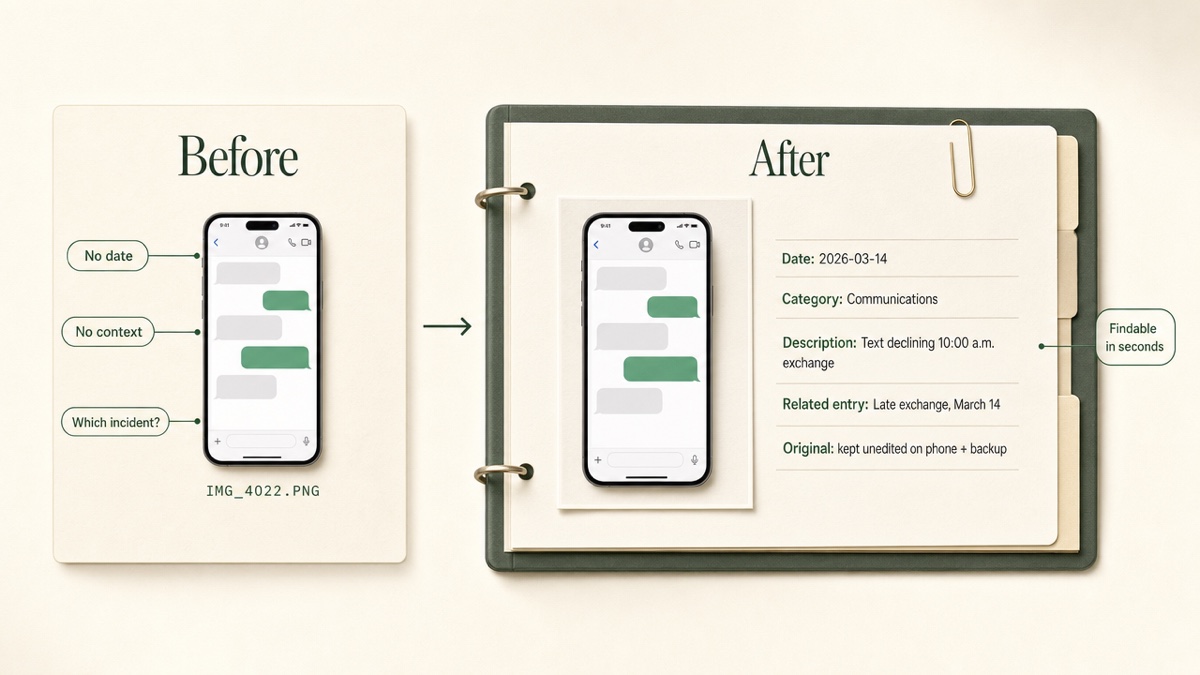
Exhibit numbering and copies follow local rules
Courts handle exhibits differently. Some require exhibits to be marked before trial, and some require several copies: for the judge, the other side, and yourself. One handbook also notes that a judge cannot look at your phone, so digital items must be printed. Pretrial orders often set disclosure deadlines, and missing them can keep evidence out. Your attorney handles this. Your job is to give them clean material they can mark.
Paper or digital
A paper binder is tangible, easy to flip through in a meeting, and close to what a courtroom ultimately uses. But it is a single copy. It can be lost, damaged, or found by someone in your home. It can't be searched, and it gets out of order every time you add a page. Rebuilding it from a camera roll is slow.
A digital binder can be searched, backed up, and sorted by date or category without re-punching pages. Its risks are different: weak passwords, a shared family computer, cloud folders synced to devices other people use, and file formats that won't open on someone else's machine.
A practical approach is to keep the digital record as the master and print only what your attorney asks for, when they ask. Back up the master in at least two places you alone control. If you keep paper, scan it so a single spilled coffee can't end the record.
Why evidence should not live in a shared app
Co-parenting apps are built for two users. Their file banks and shared calendars are designed so that both parents can see what is there. That design suits reference information. It is the wrong home for case preparation.
Evidence in a shared space can be seen, and you can't always tell who has looked or what they took from it. Privacy settings inside a shared account are one wrong tap away from exposing something. In a high-conflict case, your notes about the other parent are the last thing that should sit inside a system they also use.
Keep evidence somewhere only you can open. In Custody Proof, the evidence vault is encrypted (AES-256) before files are stored and is visible only to your account. The other parent has no account and is never invited or notified. The vault has seven categories: incidents, communications, expenses, activities, health, emotional, and witness. Notes and files attached to calendar events appear there too, and a timeline view lists everything in date order. Details: The evidence vault. If your files are currently scattered across phones and inboxes, start with how to stop losing evidence.
Exporting one PDF for your attorney
Your attorney does not want access to your account. They want a file. Ask them which format they prefer. If they don't say, a sensible order mirrors the binder:
- A one-page summary of the period
- A detailed parenting-time report, with planned versus actual when adherence is disputed
- An expense report with receipts as labeled exhibits
- An evidence report tied to dates
- The full evidence archive, only if they ask for underlying files
Custody Proof can also bind all of this into a single Court Packet PDF. It contains a plain-English summary, color-coded calendars, deviations flagged by date, the chronological journal, and evidence grouped under best-interests factors. Set the date range and child filter before exporting so the file covers only what was requested. A year of medical expenses is more useful than an all-time dump. You download the file and send it to your attorney yourself. See Reports and exports.
What a binder can't do
A well-built binder does not decide what the court sees. Your attorney decides what to offer, in what form, and with what witness to support it. Each state has its own evidence rules. A careful binder makes those decisions faster. It does not make them for you, and it does not guarantee any page will be admitted.
Start the record now
Custody Proof keeps the binder sections in one private place: parenting time, incidents, expenses, and files, ready to export as one PDF. The Documentation plan is $14.75/month or $144/year. Case Builder is $29/month or $278/year and adds Vero, the assistant that turns a voice note, pasted text, or photo into a dated draft you review. Start your record.
Frequently asked questions
Is there an app for keeping a custody binder?
Several apps store files, but most are shared between both parents. Custody Proof is built for one parent. It holds a parenting-time calendar, incident log, expense ledger, and encrypted evidence vault, and exports PDF reports for your attorney. It runs in a web browser, including on your phone.
Will the other parent know I'm keeping a binder in Custody Proof?
No. There is no shared account, no invitation, and no notification. Anything you share leaves only as a file you export yourself.
Can my attorney log into my account to see the binder?
No. There is no attorney portal. You export the reports or the Court Packet and send them yourself. This also keeps you in control of what each file covers.
I already have months of screenshots. Is it too late?
No. Add past events with their real dates and attach the files you already have. Keep the original screenshots on your phone and in a backup, even after they are in the binder.
Should I print everything?
Not up front. Keep a digital master and print what your attorney asks for. Courts often need paper or specific formats, and those requirements vary, so let your attorney set the format and the number of copies.
Should school and medical records go in my evidence binder?
Keep them in a separate reference folder. They become evidence only when they relate to a disputed issue, such as missed appointments. In that case, your attorney will tell you which records to pull into the binder.
Keep reading
- Holiday Custody Schedule Examples and How to Track Them
- How Overnights Affect Child Support
- How to Modify a Custody Agreement: Documenting the Change
- Which custody app fits your situation
Custody Proof is a documentation tool, not a law firm. Nothing on this page is legal advice. Whether and how a record is used in a case is a question for your attorney.