Google Calendar for a custody schedule: setup and where it breaks
By EJ Archuleta, Licensed attorney · Updated
You can use Google Calendar for a custody schedule: create a separate calendar that only you can see, enter your parenting time as recurring events, and give overnights one color. That handles the plan well, but it does not count overnights, show where real life departed from the plan, or prove when an entry was made. Those three gaps are the reason a calendar that looks complete can fall apart when someone asks for numbers.
This page covers how to set up a Google Calendar or spreadsheet properly, where each one breaks, and how to move your history into a dedicated tracker later without retyping it. It is general information, not legal advice. Custody orders and how time is counted vary by state, so take questions about your own order to your attorney.
Setting up a private Google Calendar
Do not put custody time on your personal calendar. Mixing it with dentist appointments and work meetings makes it hard to export cleanly later.
- Create a new calendar. In Google Calendar on a computer, open "Other calendars," choose "Create new calendar," and give it a plain name such as "Parenting time – [child's first name]."
- Keep it private. Leave sharing off. Do not add the other parent, and think carefully before adding anyone else.
- Enter the regular rotation as recurring events. Use the custom repeat option for patterns like "every 2 weeks on Friday." Set start and end times to match the exchange times in your order.
- Make each multi-night stay one event. For a weekend, the event runs Friday at pickup until Sunday at return. One event per stay is easier to count than one event per day.
- Enter holidays and summer as separate events. Do this even when they override the regular rotation. Delete the regular-rotation events they replace, or the calendar will show both.
- Color-code by meaning, not by mood. For example, one color for planned overnights, another for timed day visits, another for traded time, and another for missed time. Write the key in the calendar's description so it still makes sense in six months.
Time zones and daylight saving
If you and the other parent live in different time zones, set each event's time zone to the zone where the exchange happens. Recurring events follow the time zone they were created in. An exchange at "6 p.m." can quietly shift by an hour for a traveler, or on the day clocks change, if the zones don't match. Check the first few exchanges after each daylight saving change.
A calendar shows dates, not overnights
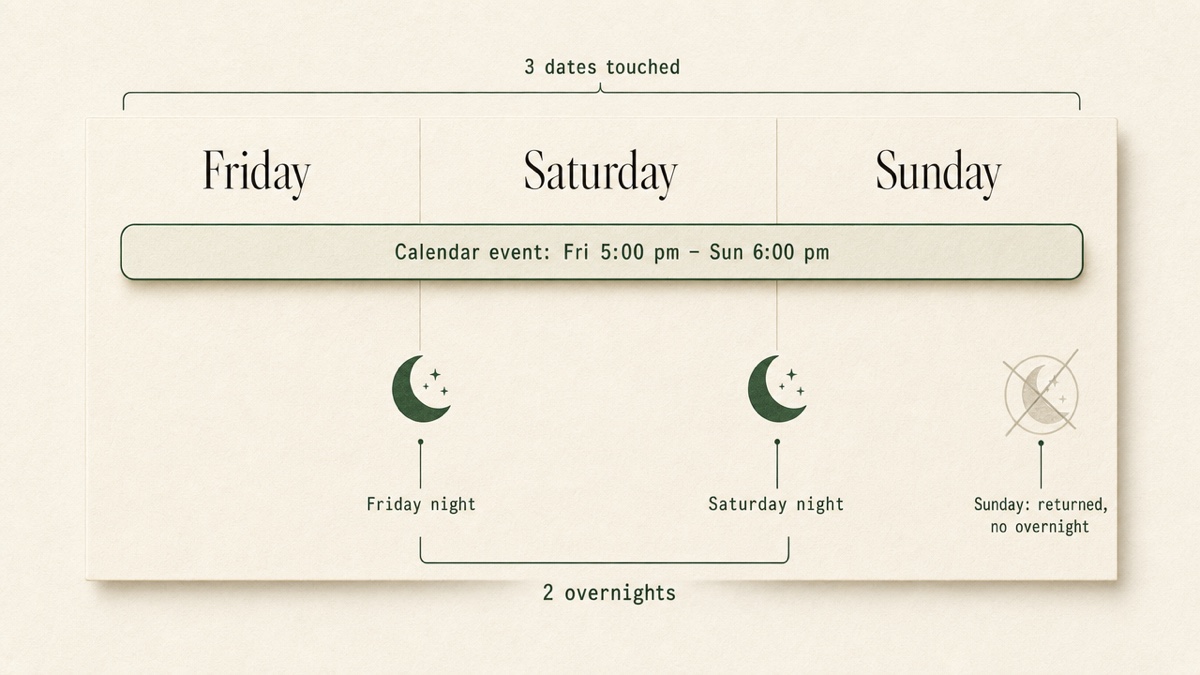
Look at a Friday-to-Sunday event on a calendar grid. It sits across three dates, and that is how most people end up counting it: three days.
Family courts commonly count parenting time by overnights, the nights the child slept at your home. Friday night plus Saturday night is 2. A stay from January 1 to January 11 is 10 nights, because the child goes back on the morning of the 11th. Google Calendar has no overnight count, so any total you make by eyeballing the grid will run one high on almost every stay. Some orders and support worksheets use hours or other methods instead. Check your order and your state's support worksheet to see which method yours uses. If it isn't clear, ask your attorney or your court's self-help center.
Day visits cause the opposite error. A Wednesday dinner from 3:30 to 7:30 is real parenting time, but it is not a night. If you count it toward your overnight share, the figure mixes two units and is easy to attack. Keep visits as a separate count of visits and hours. The full math is in how courts count parenting time.
Log what happened, not only what was planned
A recurring event is a promise the calendar makes on your behalf every other Friday. If the weekend is missed and you never touch the event, your calendar now says it happened.
When the actual time differs from the plan, don't delete or drag the planned event. Leave the plan visible and record the difference next to it:
- Missed time: Keep the planned event and add a separate event in your "missed" color, such as "Missed – not picked up, no response to 5:10 pm text." Put the facts in the description: times, what was said, and where any screenshot is stored.
- Trades: Record both sides of the trade. One event marks the time you gave, the other marks the time you received. Each description names the date of the agreement and how it was made, for example a text on March 3.
- Late exchanges: Note the scheduled time and the actual time. A late pickup is a time, so write it as one.
Write each entry the day it happens. An entry typed weeks later is a reconstruction, and it reads like one.
The spreadsheet version
A spreadsheet is better than a calendar at the one thing calendars can't do: adding up overnights. Use one row per night (or per visit) with these columns:
| Column | What goes in it |
|---|---|
| Date | The night in question (the evening it starts) |
| Planned | Who the order says has this night |
| Actual | Who actually had the child that night |
| Overnight | 1 if the child slept at your home, 0 if not |
| Visit hours | Hours of a same-day visit, otherwise blank |
| Deviation | Missed, extra, traded, late, or blank |
| Notes | Facts only: times, messages, file names of evidence |
| Entered on | The date you typed the row |
Add a total for the Overnight column and a count of rows where Planned and Actual differ, and you have a basic plan-versus-actual summary. If you have more than one child, decide up front whether a row is a night for the household or a night per child. Mixing the two inflates your totals.
Google Sheets keeps a version history (File → Version history), and Excel files stored in OneDrive or SharePoint keep one as well. That history can show when cells changed. If you plan to share the file, make a dated copy and share the copy, not the original. The copy starts without the earlier history, and the original, along with its version history, stays with you.
Paper and printable calendars work on the same principle: write planned time in one color and actual time in another, and date your notes. Paper can't add up totals or export anything, so expect to retype it all later.
Why a shared calendar is a weak record
If you share a Google Calendar with the other parent and give them permission to make changes, they can edit, move, or delete events, including your notes about missed time. Google Calendar does not give ordinary users a clear, event-by-event edit history to show who changed what and when. Change notification emails, if you turn them on, capture only part of that. Even view-only sharing means the other parent sees your documentation as you write it.
If a shared calendar already exists for logistics, keep it for logistics only. Keep your record somewhere only you control. This applies whether or not the other parent cooperates, because nothing in your record depends on them.
Turning a DIY log into something your attorney can use
A wall of calendar screenshots is hard to work with. Before a meeting, prepare:
- A one-page summary for a defined period: planned overnights, actual overnights, missed nights, extra nights, and visit hours.
- A dated list of every deviation, each with a short factual note.
- The underlying evidence files, renamed by date so a file name means something.
- Your entry dates, so it's clear the log was kept as things happened and not assembled later.
Write neutrally. "Child returned 7:40 p.m.; scheduled 6:00 p.m." is useful. "Late again, as always" is commentary. Ask your attorney what format they want before you build anything.
When DIY is enough
A Google Calendar or spreadsheet can be all you need if:
- the schedule is simple and mostly followed,
- you update it the same day, every time,
- nobody is contesting overnight percentages, and
- you have no expenses, incidents, or files to tie to specific dates.
DIY starts to cost more than it saves when deviations pile up, when an overnight count may matter for support or modification, when holidays alternate by year, or when you find yourself reconstructing weeks from memory.
Moving to a tracker without retyping
Your Google Calendar history doesn't have to be thrown away. Google Calendar can export a calendar as an .ics file from its settings. That file can go into Custody Proof's import tool. Custody Proof does not sync with Google Calendar. This is a one-time file import, and you review every entry before it saves.
How the import works, per the import guide:
- Upload an .ics file of up to 15 MB or 5,000 entries. Re-importing the same file never creates duplicates.
- Entries are sorted into groups, such as parenting time, medical, and school, and each has its own checkbox.
- If custody blocks name a parent, you're asked which parent you are. Only your time is pre-checked, so the other parent's time is never logged as yours.
- Have a spreadsheet instead? The import page provides a ready-made prompt for ChatGPT or Claude that turns your rows into an importable file. Anything it can't date is skipped and listed, never guessed.
Once the history is in, overnights and timed visits are counted separately. Your planned schedule is compared against what you logged, and you can confirm the record as you go. That workflow is described in keeping your schedule accurate. Custody Proof is private to one parent, and the other parent is never invited or notified.
If your calendar has reached the point where it shows the plan but not the story, start your record. Plans start at $14.75/month, and the first charge comes with a 30-day money-back guarantee.
Frequently asked questions
Can I use Google Calendar for my custody schedule without sharing it?
Yes. Create a separate calendar and leave sharing off. It stays visible only to your Google account. Keep custody time out of your personal calendar so it exports cleanly later.
How do I count custody days from a calendar?
Count nights, not dates. A stay from Friday to Sunday is 2 overnights, and January 1 to 11 is 10. Track same-day visits separately as visits and hours. Your order or support worksheet may count differently, so confirm with your attorney.
Should I delete a planned event when the visit doesn't happen?
No. Leave the planned event and add a separate entry marking the time as missed, with the facts and the date you wrote it. The gap between plan and reality is the record.
Is there a Custody Proof template for Excel or Google Sheets?
No. The column layout above is enough to build your own. If you later move to Custody Proof, the import page includes a prompt that converts an existing spreadsheet into an importable file.
Does Custody Proof sync with Google Calendar?
No. You export an .ics file from Google Calendar and import it once. You review every entry before it saves, and re-importing the same file doesn't create duplicates.
Keep reading
- Representing Yourself in Custody Court
- What Is a Child Custody Evaluation? How to Prepare
- Parallel Parenting Plan Template for High-Conflict Cases
- Which custody app fits your situation
Custody Proof is a documentation tool, not a law firm. Nothing on this page is legal advice. Whether and how a record is used in a case is a question for your attorney.