Digital safety during divorce: protecting your accounts and records
By EJ Archuleta, Licensed attorney · Updated
Digital safety during divorce comes down to three things: close the access your ex already has, watch for signs that you are being monitored, and keep your custody documentation where they cannot reach it.
Start with your email, because it resets every other password. Then work through your phone, shared plans, cloud accounts and home network. If you suspect stalkerware, talk to a domestic violence advocate before you remove anything.
Most people's digital lives were built as a couple: one family plan, one cloud account, one router password taped inside a cabinet. None of that changes when someone moves out. This page is a checklist for undoing it carefully.
This is general information, not legal or security advice for your situation. For your case, talk to your own attorney. If you are in danger, talk to a qualified advocate.
Assume what was shared is still shared
Family law guidance tells parents in an active case to assume the other side could reach any of their information if they went looking. On shared devices, sign out of everything.
That is not paranoia. It is an inventory. Anything your ex set up, paid for, or once knew the password to is a door until you close it.
The safe order of operations
The order matters as much as the steps. Changing everything at once can tip off someone who is watching. It can also destroy the evidence your attorney may want.
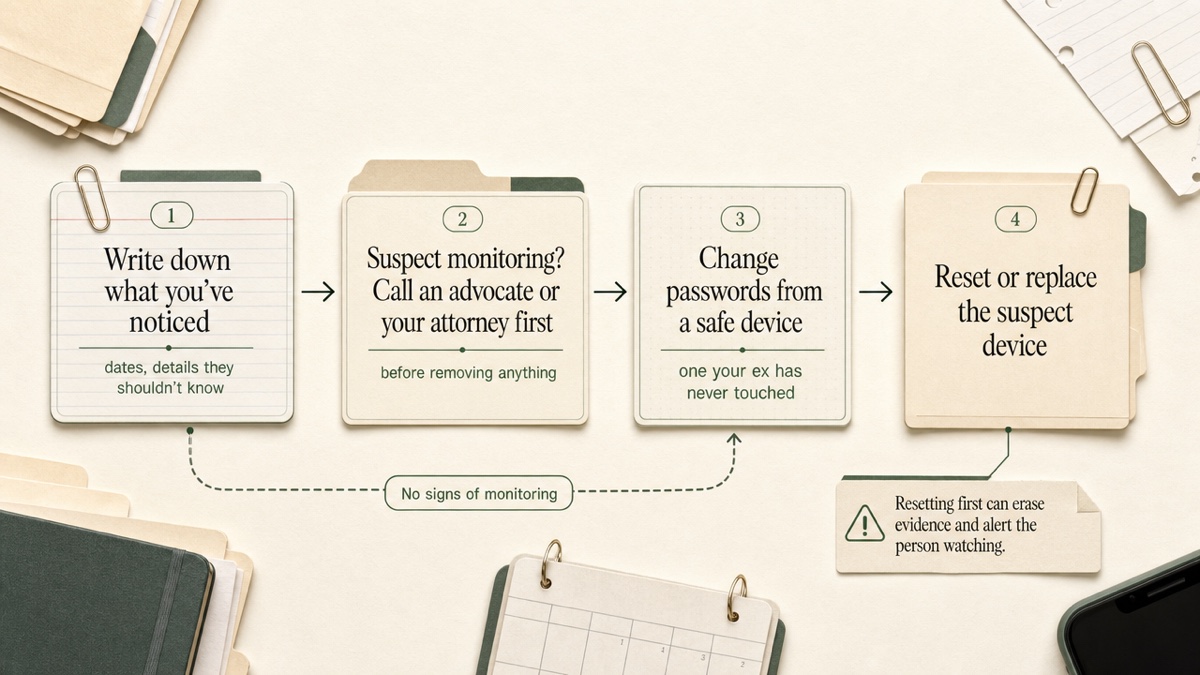
- Write down what you have noticed. Note the dates, and the things your ex knew that they should not have known.
- If you suspect monitoring, call an advocate or your attorney before you remove it.
- Change passwords from a device your ex has never handled. A library computer or a new phone works.
- Reset or replace compromised devices last.
Email first
Your email holds more about you than any other account. It is also the key to every "forgot password" link you have. Secure it before anything else.
- Open a new account with a different provider. Create it on a safe device and do not tell your ex it exists. Use it for your attorney, your court paperwork and your documentation tools.
- In your existing account, check the settings for forwarding rules you did not create. A hidden rule can quietly copy every message to someone else.
- Check your sent folder for messages you did not send.
- Review recovery details. Remove any recovery phone number or backup email that belongs to your ex.
Passwords, security questions and two-factor authentication
Change passwords on the accounts that matter most, in this order:
- Phone carrier
- Cloud storage
- Banking
- Social media, which often signs you into other services
Use long, random passwords, not birthdays or pet names. If you use a password manager, change its master password first.
Security questions are the quiet backdoor. Your ex likely knows your mother's maiden name and your first pet. Change the answers to something false or half-true that only you know, and store those answers in the password manager.
Turn on two-factor authentication everywhere it is offered. Send codes to a phone only you control. Also turn on alerts for sign-ins from unknown devices.
Then call or check each account's authorized contacts and remove your ex. Otherwise they may be able to start a password reset through customer service. If finances are tangled, consider a credit freeze or credit-bureau alerts for new accounts.
Shared family plans, cloud backups and location sharing
These are the access points people forget, because nothing about them feels like "logging in."
- Phone family plans. Whoever holds the account may be able to see billing and usage details, and can make changes to your line. Moving to your own plan removes that lever.
- Cloud backups. A shared iCloud or Google account can hold photos, videos, financial documents and location history. Your phone may still be backing up to an account your ex can open.
- Location sharing. Check Find My, Google location sharing, family-safety apps, and the location settings inside maps and social apps. Check any shared device too, such as a tablet the children carry between homes.
- Family sharing and purchases. Shared app stores, streaming profiles and photo albums all leak information.
One caution: if you suspect active monitoring, a sudden change here is exactly what a watching ex would notice. Talk to an advocate about timing.
Your phone: signs of stalkerware and when to get help
Stalkerware is software installed on a phone without the owner's knowledge. It can track location, read texts and email, view photos, record calls through the microphone, and watch browsing.
It is hard to detect directly. The warning signs are usually indirect:
- Your ex knows where you were, who you texted, or what you said in a private conversation.
- Your ex had unsupervised access to your phone, or knows your passcode.
- The phone behaves differently than it used to.
- The phone has been jailbroken or rooted, which some stalkerware requires. If you did not do that, someone else may have.
What to do. The FTC warns that an abuser may escalate when they sense their access is being cut off. Contact a domestic violence advocate before you remove anything, and preserve what you can before a reset.
The safest option may be a new phone tied to an account your ex cannot reach. A factory reset may remove stalkerware, but restoring the old backup can bring it right back. A carrier service center can also check a phone. Some people keep a separate prepaid phone for private calls in the meantime.
Going forward, set your phone to auto-lock, use a passcode of at least six digits, and keep the phone with you.
The home: Wi-Fi, smart devices and the car
If you stayed in the home, the router is a target. Anyone who knows its admin password may be able to log in remotely and see your browsing. Change both the Wi-Fi password and the admin password, or factory-reset or replace the router.
Then review everything that connects to it:
- Security cameras and video doorbells
- Alarm systems and keyless entry
- Smart speakers
- Thermostats
Remove your ex as a user, or reset the device.
GPS trackers can be hidden in a car or in everyday items like a bag. If your ex keeps turning up where you are, have the car checked.
Photos: what the file says besides the picture
A photo can carry data you never see on screen.
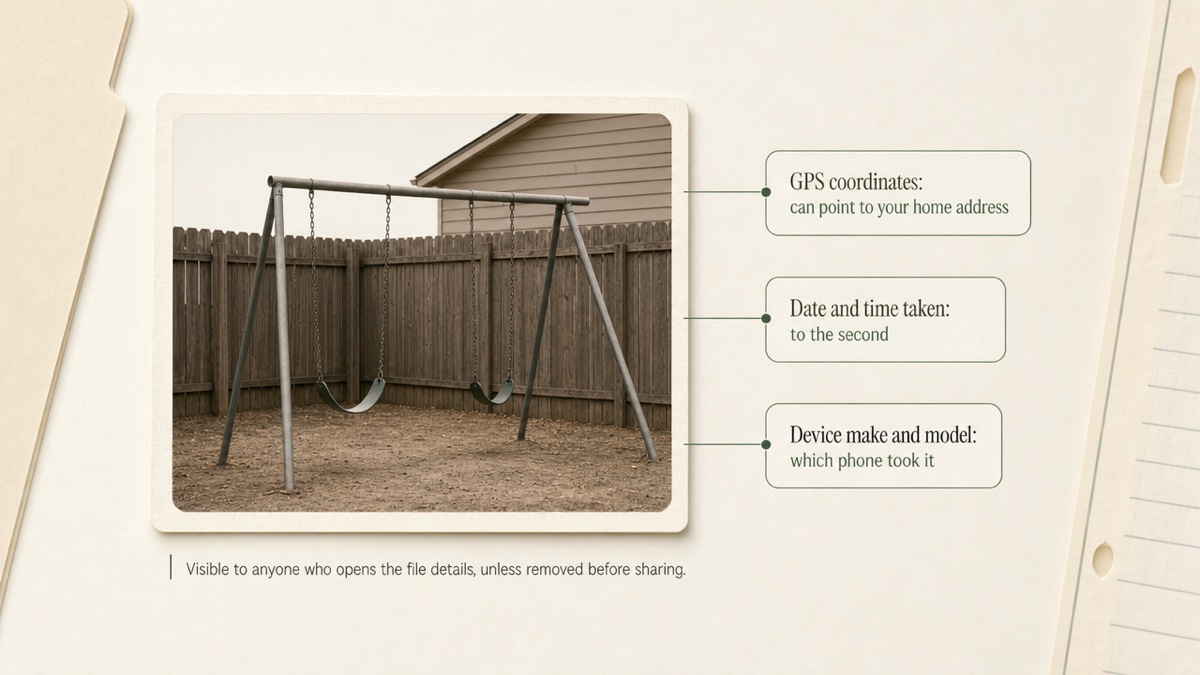
That data, called EXIF, can include GPS coordinates, the exact time the photo was taken, and the phone model. Posting a photo or texting one to your ex can reveal where you live or where the children were.
You can check a photo's details in your phone's info panel. Most phones let you turn off location for the camera, or remove location before sharing.
For evidence, the logic runs the other way. Keep your original files untouched. The date and time on a file can help show when something happened. Strip data from copies you share publicly, not from the originals your attorney may need.
Don't delete, and don't snoop
Two instincts feel protective and can hurt you.
Deleting. Wiping texts, posts or apps while a case is pending can look like destroying evidence. Courts can respond with sanctions.. Ask your attorney before you delete anything, including an app you think is spyware.
Accessing their accounts. Reading your ex's email, or logging into an account using a password you were never given, is not allowed, even for a spouse. Neither is putting tracking or recording tools on their devices. It can break federal and state computer-access and wiretap laws, which can mean criminal charges or a lawsuit against you. Evidence gathered that way may be thrown out, and the court may also sanction you..
Recording calls has its own rules. Some states require only one party's consent and others require everyone's. If the other person is in a different state, the stricter rule may apply.. Ask your attorney before you record anything.
Tell your attorney about suspected tampering
If you think your phone, email or car has been compromised, tell your attorney early. Bring specifics:
- What your ex knew, and when you noticed
- Which accounts showed sign-ins or forwarding rules you did not set up
- Which devices you have already changed or reset
Your attorney can decide whether it needs to be preserved, raised with the court, or reported. That decision depends on your state and your case. Write your notes on a device you trust, not the one you suspect.
Why your documentation should live where your ex has no access
None of the steps above helps if your custody notes sit in a shared calendar, a co-parenting app your ex also logs into, or a notes app that syncs to the old family cloud. A hostile ex should not be able to read your notes, or even learn that you are keeping them.
Custody Proof is built for one parent. The other parent has no account and no view, receives no invitation, and gets no notification, including when you flag a violation. If you want to share a record, you export a file and hand it over yourself. More on who operates it and what it does not do is on the About page.
How the data is protected. Evidence files and receipts are encrypted (AES-256) before they are stored, in private storage tied to your account. Connections use HTTPS. Details are in Your account, data, and privacy and the evidence vault.
What it does not do. It does not scan your phone or find trackers. Your login is still only as safe as your email and password, so:
- Sign up with the private email you created.
- If you are already a user, change your login email in Settings → Profile. The confirmation code goes to the new address, so your old inbox is not needed.
- Changing your password there signs out your other devices.
Start a private record. Plans start at $14.75/month, with a 30-day money-back guarantee on your first charge.
Frequently asked questions
Will my ex know I'm using Custody Proof?
Not from the app. There is no shared account, no invitation and no notification. Your ex could still find out through a compromised email account or phone, which is why you should secure those first and use a private email to sign up.
Can Custody Proof tell me if my phone has spyware?
No. It is a documentation tool. For a suspected stalkerware problem, contact a domestic violence advocate or a carrier service center. Talk to your attorney before removing anything.
Should I factory-reset my phone right away?
Not before you have preserved evidence and, if you suspect monitoring, talked to an advocate. Also remember that restoring the old backup to a new or reset phone can reinstall what you removed.
Is it okay to check my ex's phone or email for evidence?
No. Accessing accounts you were not given the password to can create legal problems for you and weaken the evidence. Bring your concerns to your attorney instead.
What if my evidence is already in a shared cloud account?
Copy it to storage only you control. Leave the originals where they are until your attorney says otherwise. Moving files out is fine. Deleting them mid-case is a question for your lawyer.
Keep reading
- Co-Parent Harassing You? How to Document It
- How to Co-Parent With an Abuser: Keep a Private Record
- How to Track Custody Schedule Swaps
- Which custody app fits your situation
Custody Proof is a documentation tool, not a law firm. Nothing on this page is legal advice. Whether and how a record is used in a case is a question for your attorney.