Co-parent harassing you? Document it, don't engage
By EJ Archuleta, Licensed attorney · Updated
If your co-parent is harassing you, do four things: get safe first if there are threats, cut your replies down to what the children actually need, save every message instead of deleting it, and log each incident the same day. That same-day log lets you show your attorney a dated pattern instead of a feeling.

You don't need the other parent to join an app, agree to rules, or change their behavior for any of this to work. Everything below happens on your own phone, in your own record.
This page is general information, not legal advice. Harassment and protective-order law varies by state, so bring questions about your case to a family law attorney where you live.
Harassment versus rude co-parenting
Not every unpleasant message is harassment. A curt "you're late again" is rude. A sarcastic reply about the soccer schedule is rude. Rude co-parenting is still worth noting if it touches the children, but it usually isn't what lawyers mean by harassment.
In general terms, communication starts to look like harassment when it has some of these features:
- Volume. Dozens of messages after you've already answered, or a wall of texts in one evening.
- Timing. Messages at hours meant to wake you, or bursts that track your schedule.
- Content. Threats, slurs, sexual insults, or degrading language that has nothing to do with the children.
- Channel-hopping. When you stop answering texts, it moves to email, then voicemail, then your sister's phone, then a public post.
- Purpose. The message isn't trying to arrange anything. It's trying to upset, frighten, or control.
Pattern often matters as much as any single message. One nasty text is a bad day. Forty texts across a week, most after midnight, is a pattern. Whether a pattern meets your state's legal definition is a question for your attorney.
Log every incident the same day
A screenshot proves a message existed. A log entry explains it. You want both.
For each incident, write down the same fields every time:
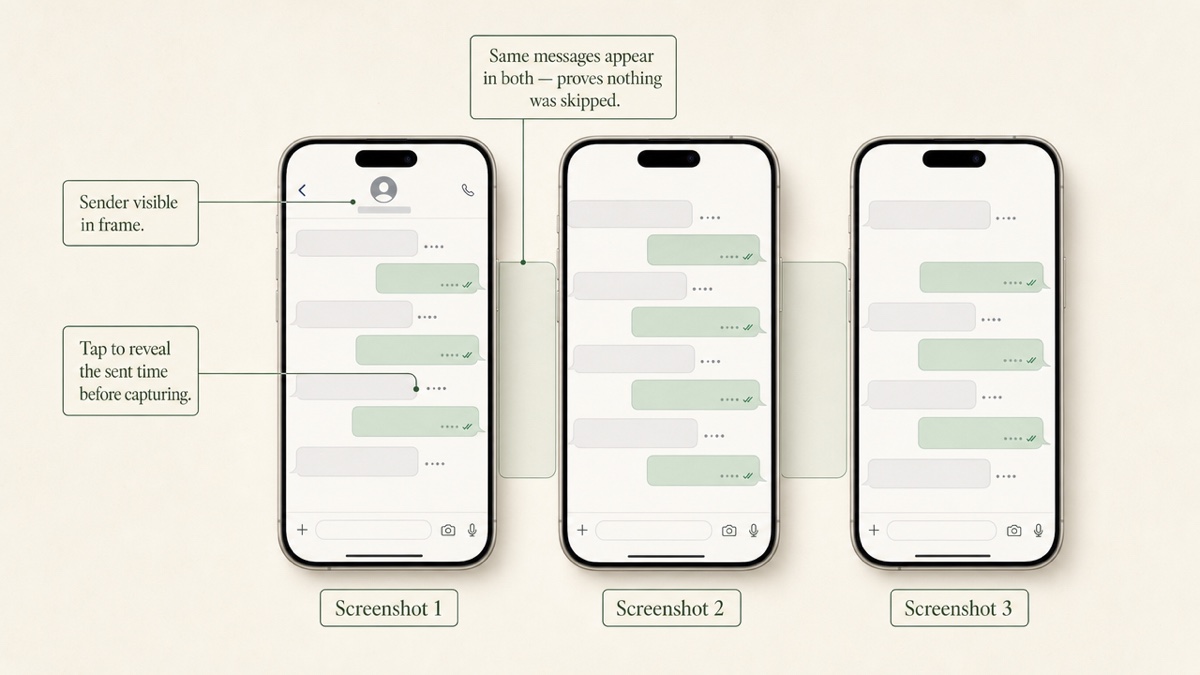
- Date and time the message was sent. On some phones you have to tap or swipe a message to reveal its timestamp. Use that, not the time you noticed it.
- Channel. Text, email, voicemail, a call, a direct message, a public post, or a message relayed through someone else.
- Sender details. The phone number, email address, or account name, not just "my ex."
- The exact words. Quote them. Don't paraphrase. "He threatened me" is a conclusion. "If you take her to your mom's again you'll regret it" is a quote.
- What prompted it, if anything. "No prior message from me since 4:10 p.m." is useful context.
- What you did. "No response," or the exact text of your reply.
- When you captured it. The date you took the screenshot or saved the email.
Do it the same day. Memory blurs within a week, and a log written months later reads like a reconstruction. A log written that evening reads like a record.
Keep the log factual. No adjectives, no diagnosis of the other parent, no predictions. The quote does the work.
Screenshots that hold up to scrutiny
Screenshots get questioned when they're cropped, undated, or missing the message before and after. A few habits help:
- Show the timestamp and the sender in the frame. If the timestamp is hidden, reveal it first.
- Capture the whole conversation, not one message. A single hostile line invites "you left out what she said first." Courts often want to see the full exchange, because harassment is usually a series of interactions.
- Use overlapping screenshots for long threads. Scroll only halfway each time, so the bottom of one screenshot becomes the top of the next. That way nobody can claim a gap.
- Save voicemails as audio files with their date and time, and keep call logs.
- Keep emails whole, with sender, recipient, date, and time visible.
You usually can't just hand the judge your phone, and a court may hold onto a device offered as evidence. Capture messages in a form you can give your attorney instead. Screenshots alone don't always meet a state's evidence rules. Ask your attorney whether they want a full text export as well.
Social media posts disappear fast
Posts get edited, deleted, or made private, sometimes within minutes. If the other parent posts about you or the children:
- Screenshot it right away, including the account name, the date, and the comments underneath.
- Note the web address of the post or profile.
- Write down who else saw it, in case it vanishes before you capture it.
Then look at your own accounts. Set them to maximum privacy, change passwords, avoid location check-ins, and ask friends not to tag where you are.
Don't post about the other parent, even vaguely. Assume anything you post can end up in front of the judge. And don't delete your own old posts or messages to tidy up. Deleting electronic evidence can create serious legal problems. Vent to a therapist, a friend in person, or your lawyer.
Show the pattern: frequency over time
A stack of screenshots shows that bad messages happened. A pattern shows how often, when, and whether it's getting worse. That is often what an attorney most wants to see.
Once your log has a few weeks in it, count:
- Messages per day or per week. Rising, falling, or spiking?
- Late-night messages. How many arrived between, say, 10 p.m. and 6 a.m.?
- Clusters. Do bursts line up with exchanges, court dates, or a new partner?
- Escalation. Did the language move from insults to threats?
A simple weekly line ("Week of March 3: 47 messages, 31 after 10 p.m., no reply from me") turns a pile of evidence into a summary someone can read in a minute.
Manufactured urgency versus real emergencies
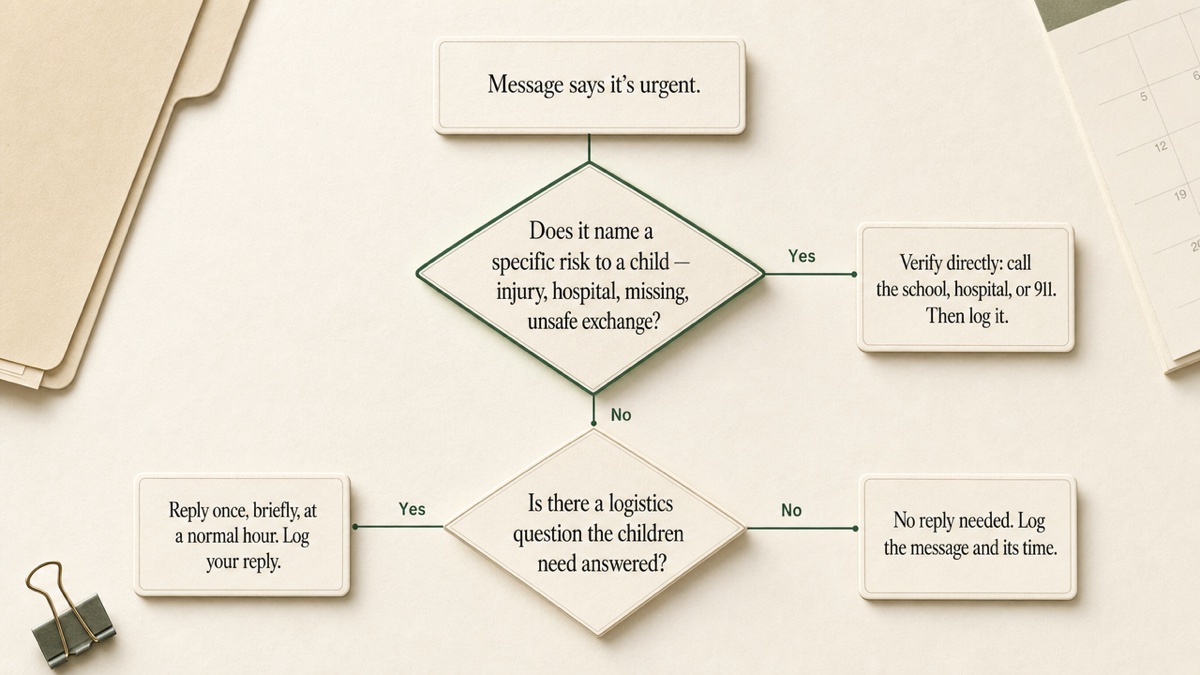
High-conflict exes often label everything urgent. "Call me NOW." "This is about your son." "Answer or I'm calling the police." The goal is to pull you into a live argument on their schedule.
A simple rule:
- If the message names a specific, real risk to a child (an injury, a hospital, a missing child, a safety problem at an exchange), verify it directly. Call the school, the hospital, or 911. Don't rely only on the other parent's account.
- If it demands an immediate response but contains no concrete facts, it can wait. Reply once, during normal hours, about the logistics only. Log the message and the time you answered.
Respond minimally, and don't retaliate
Your replies become part of the record too. One angry text from you can blur a month of clean documentation into "they both behave badly."
Keep replies short, neutral, and about the children:
- "Pickup is at 6:00 at the school, per the order."
- "Received. I'll have her inhaler in her backpack."
- "I'll respond to schedule questions by email."
Leave out sarcasm, defenses of your character, and questions you don't need answered.
If it feels safe, you can tell the other parent once, in writing, to stop contacting you except about the children. Then stop responding to anything else. Most custody orders require some communication about the children, so ask your attorney what your order requires before you go fully silent. Never block a channel the order says you must use without talking to your attorney first.
When to talk to your attorney about protective options
Bring your log to your attorney when:
- The messages include threats to you, the children, or anyone else.
- Volume or timing keeps escalating despite minimal replies.
- The other parent shows up uninvited, tracks your location, or contacts you through third parties.
- The harassment spills into exchanges or the children start hearing it.
Depending on your state and facts, an attorney may discuss options such as a protective order, communication terms in a modified order, or enforcement of an existing order. Whether any of them fits your situation is a legal judgment. Your job is to bring a record that makes that judgment easier.
For how this record fits with your parenting-time log and expense receipts, see how to document custody for court.
If there are threats to your safety
If you or your children are in immediate danger, call 911.
If threats are escalating but not immediate, the National Domestic Violence Hotline (1-800-799-7233) offers confidential help with safety planning, and its advocates can explain protective orders in general terms. Keep documenting while you get help. The record and the safety plan work together.
If you don't have a safe device, public libraries offer computers and printers.
Keeping the record in one private place
Custody Proof is a private documentation app for one parent. The other parent is never invited and never notified. It doesn't read, filter, or block anyone's messages. It's where you put what already arrived on your phone.
In the evidence vault, file each incident under Communications or Incidents. Add the date, write the details, and attach the screenshots, voicemail audio, or email PDFs (up to 25 MB per file). Files are encrypted with AES-256 before storage. The Timeline and Calendar views lay incidents out by date, which makes clusters easier to spot. When your attorney asks, export a PDF Evidence Report with exhibits, or a ZIP with a spreadsheet log of every entry and its attachments.
On the Case Builder plan, Vero can turn a batch of screenshots or a pasted thread into dated drafts. If a photo carries its capture date, Vero uses it. If no date can be found, the draft can't be saved until you add one. You review every draft before it saves.
If you're wondering why a shared messaging app isn't the answer here, read why co-parenting apps fail in high-conflict cases.
Start your private record. Documentation is $14.75/month or $144/year. Case Builder, which adds Vero, is $29/month or $278/year. Both come with a 30-day money-back guarantee on your first charge.
Frequently asked questions
Will my ex know I'm documenting their messages?
Not through Custody Proof. There's no shared account, invitation, or notification. Nothing you log is sent to the other parent. If a record is shared, it's because you exported a file and handed it over yourself.
Should I block my co-parent?
Possibly for some channels, but check with your attorney first. Many orders require communication about the children, and blocking the required channel can create its own problem. One option is to restrict contact to a single channel, such as email, and keep documenting everything on it.
Are screenshots enough?
Sometimes not on their own. Evidence rules differ by state, and attorneys often want full conversations or text exports in addition to screenshots. Capture both, keep the originals on your phone, and ask your attorney what format they need.
I already deleted some messages. Is it too late?
No. Save everything you still have, starting today. Write a dated note describing what you deleted and roughly when. Don't delete anything else, and tell your attorney.
Can I add old messages to Custody Proof?
Yes. Enter each past incident with its real date and attach the screenshots you saved then. On Case Builder, Vero can draft entries from older screenshots, and you confirm or add each date before saving.
Keep reading
- How to Co-Parent With an Abuser: Keep a Private Record
- How to Track Custody Schedule Swaps
- How to Respond to Hostile Texts From Your Ex
- Which custody app fits your situation
Custody Proof is a documentation tool, not a law firm. Nothing on this page is legal advice. Whether and how a record is used in a case is a question for your attorney.