What a Court-Ready Custody Report Should Contain for Your Attorney
By EJ Archuleta, Licensed attorney · Updated
A court-ready custody report gives a busy reader the answer on page one: a short summary of the period. It then backs that summary up with overnight totals, a comparison of the schedule to what actually happened, a dated log of violations and exchanges, an expense ledger with reimbursement status, and an indexed set of evidence with the originals attached. If an attorney or judge can't tell what the dispute is about within a minute, the report isn't ready yet, no matter how many pages it has.

This page covers what belongs in each section, which format to use, and what order to hand things over in. It is general information, not legal advice. Custody procedure varies by state and by courtroom, so questions about your own case belong with your own attorney.
Who reads it, and how
Your attorney will read the report closely once. After that, it gets skimmed: by opposing counsel, by a mediator, and possibly by a judge who has a full docket. Skimmers look for three things in this order:
- What is the claim? One paragraph, in plain words.
- What are the numbers? Totals for a stated period.
- Where is the proof? A date they can find in a table, with the matching exhibit.
A report built around that path is easy to use. A report built as a 200-page message dump makes your lawyer do the sorting, and your lawyer bills for that time. The attorney fees guide explains how organized records change what you pay for.
The sections that matter
1. A summary first
Start with a one-page summary: the date range, the children covered, overnight totals, the number of missed or extra nights against the schedule, the number of violations logged, and the reimbursement balance. Leave out adjectives. "Eleven of 26 scheduled exchanges started more than 30 minutes late" is a finding. "They are always late" is an opinion, and the reader will treat it as one.
2. Parenting time, counted in one unit
Many family courts discuss parenting time in overnights. That makes Friday after school to Sunday evening two nights, and a January 1 to January 11 stay ten nights. Some orders and support worksheets count time differently. Follow your order and ask your attorney how your jurisdiction counts.
Whatever unit you use, keep it consistent:
- Overnights belong in the percentage.
- Timed day visits, such as a Wednesday dinner from 3:30 to 7:30, belong in a separate count with total hours.
When the two are mixed, the percentage stops meaning anything specific, and anyone who wants to dispute it has an easy target. If you have more than one child, report calendar nights and child-nights separately and label both. One night with two children is one night and two child-nights. Without labels, the number looks inflated.
3. Planned vs. actual, with a stated denominator
This section matters most when the dispute is about who follows the schedule. It lays the schedule the order sets beside what actually happened, day by day: nights kept as planned, nights missed, and extra nights.
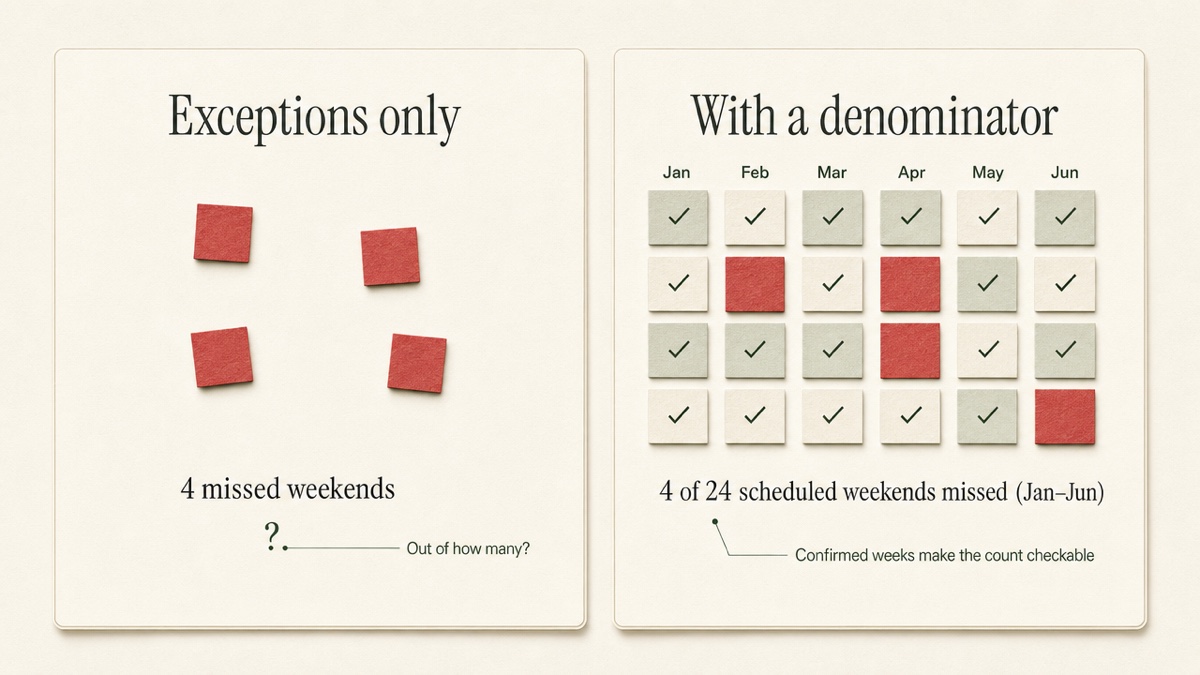
The denominator is what makes the comparison credible. "Four missed weekends" tells the reader very little on its own. "Four missed out of 24 scheduled weekends, January through June" can be checked. A log that records only the bad days has no denominator, so the reader can't tell whether four is a pattern or an exception. Recording the weeks that went as planned is what gives the missed weeks their meaning.
4. Violation and exchange log
Each row should show a date, a time, what was scheduled, what happened, and a reference to any exhibit. Delaware's custody instructions, for example, ask filers to be as specific as possible about places, dates, times, and who handles transportation. That is a useful standard to aim for in any state. Keep descriptions short and factual. A late pickup is a clock time. A missed weekend is a date. Keep your feelings about either out of the row.
5. Expense ledger with reimbursement status
An expense report should include summary totals, a breakdown by category, and a line-item ledger. Each line shows the date incurred, the amount, the vendor, the child, the share owed, and a status: not requested, unpaid, partially paid, paid, or disputed. Attach receipts as labeled exhibits so each line item points to its proof. Whether a particular cost is shared under your order is a question for your attorney, not for the spreadsheet.
6. Evidence index with originals
An evidence report lists each item by date and category, with an exhibit label that matches the log. File names like IMG_4022 mean nothing to a reader. Keep the original files as well, because your attorney may need them in their original form. The index is what makes the exhibits easy to find. The originals are what let someone check them.
PDF or spreadsheet: when to use each
| Format | Best for | Weak at |
|---|---|---|
| Reading, printing, hearing binders, mediators | Re-sorting or recalculating | |
| CSV / spreadsheet | Attorneys who check math, filter, or build their own exhibits | Being read cold by a judge |
Most attorneys want the PDF to read and the spreadsheet to check it. If you aren't sure what yours wants, ask before you export.
The packet order to hand your attorney
When your attorney hasn't specified an order, this one follows how readers skim:
- One-page summary of the period.
- Detailed report: parenting time tables, the violation log, and planned vs. actual if adherence is in dispute.
- Expense report, filtered to what was asked for, with receipts as exhibits.
- Evidence report: the dated index with exhibits.
- Originals, only if requested.
Filter before you export. A report on one child, this school year, medical expenses only, is more useful than a dump of everything you have ever recorded. How to document custody for court covers building the underlying record.
Be careful with "court-admissible"
No app, export, or certificate decides what a court accepts. Admissibility is the court's call, made in your case under your state's rules, often after the other side has had a chance to object. Many courts issue pretrial or scheduling orders requiring the parties to exchange exhibit lists and raise objections ahead of time, so the judge can focus on the disputed exhibits. Whether and how this applies depends on your court and your case.
What a good report can do is make your records dated, consistent, filtered, and easy to check. That helps your attorney. It doesn't decide anything for the court.
Two practical cautions:
- Deadlines vary. Some courts require disclosures or reports to be exchanged a set number of days before a hearing or mediation, and the timing differs from state to state. Ask your attorney about your local rules.
- Some documents shouldn't travel. Reports prepared by court evaluators or investigators can carry limits on who may see or share them, including bans on posting them online or showing them to the children. Don't fold them into your own packet without asking your attorney first. Leave the children's school and medical details out of anything you share widely.
How Custody Proof builds these reports
Custody Proof is private documentation software for one parent. The other parent is never invited or notified, and you share a record by exporting a file and handing it over yourself. (For how this differs from shared apps, see Custody Proof vs. co-parenting apps.)
The Reports page exports, for whatever time period and children you select:
- Stats Summary (1 page): overnight totals for the period.
- Detailed PDF Report: custody time per child, tables, and violations, with nights and child-nights labeled separately. Before each export, it asks whether to include a Planned vs. Actual section. That section compares your saved schedule to your calendar and shows your "Confirmed through" date when you have reviewed the record.
- Expense Report: summary totals, a category breakdown, the ledger with statuses, and image receipts embedded as labeled exhibits (E-1, E-2).
- PDF Evidence Report: vault entries with a cover page and exhibits.
- Export All Evidence (ZIP): a spreadsheet log, a formatted report, and every original attachment, organized in folders.
- CSV: your raw custody data for spreadsheet work.
If you want everything in one document, the Court Packet combines a plain-English summary, color-coded custody calendars, deviations flagged in red, and a chronological journal. It also groups evidence under best-interests factors and includes a sworn verification page. You can review a sample Court Packet built from a fictional family. Full export details are in Reports and exports.
Overnights and timed visits are always counted separately, using one counting engine, so the calendar, dashboard, and every report show the same numbers for the same period.
Start your record: Documentation is $14.75/month or $144/year. Case Builder, which adds Vero, the AI assistant, is $29/month or $278/year. Your first charge is covered by a 30-day money-back guarantee. Create your account.
Frequently asked questions
What makes a custody report "court-ready"?
It is clear, consistent, and easy to check. The summary comes first, followed by totals for a stated period, then dated logs, then indexed exhibits that link back to the originals. Being "court-ready" describes how usable the report is. It says nothing about whether the court will admit it.
Does exporting a report make my records admissible?
No. The court decides admissibility under your state's rules. Electronic records must be authenticated, meaning someone has to show they are what you say they are. This is often done through testimony from a person with knowledge, such as whoever sent, received or created them, but courts accept other methods too, and the rules vary by state. Ask your attorney how your records would be presented.
Can I send my report directly to my attorney or the court?
Custody Proof has no attorney portal and no direct filing. You export the PDF, CSV, or ZIP and give it to your attorney yourself. What gets filed with the court, and how, is up to your attorney.
Should I include planned vs. actual in every report?
Not always. It is most useful when the dispute is about who follows the schedule. When the issue is expenses, a health concern, or something else entirely, leaving it out keeps the report focused. You choose each time you export.
Why does my report show nights and child-nights separately?
They answer different questions. Nights measure how much of the time you have the children. Child-nights add up the overnight care given to each child. Labeling both keeps a reader from thinking the count was inflated.
Keep reading
- 60/40 Custody Schedule Examples and the Overnight Math
- Co-Parent Keeps Changing Custody Schedule?
- How to Document Restraining Order Violations
- Which custody app fits your situation
Custody Proof is a documentation tool, not a law firm. Nothing on this page is legal advice. Whether and how a record is used in a case is a question for your attorney.