Can a judge order you to use a co-parenting app?
By EJ Archuleta, Licensed attorney · Updated
Yes, a judge can order a co-parenting app. In many U.S. family courts, a judge can order both parents to use a specific shared co-parenting app and to keep child-related communication inside it. If you are under that kind of order, use the app exactly as the order says. A separate private record of your own time, incidents, and receipts does not replace that app. It is a different job, and the two can sit side by side without conflict.
This page explains why courts order these apps, what "court-approved" means, how to comply, and what a shared app was never built to capture. It is general information, not legal advice. Custody law and court practice vary by state and county, so ask your own attorney about your order.
Why judges order shared apps
The usual reason is conflict. When two parents argue by text, call at all hours, or dispute what was said, a judge has a few options. Ordering one shared channel is one of the cheapest.
A shared app gives the court three things:
- One channel. Messages about the children go to one place instead of texts, email, voicemail, and notes in a backpack.
- A fixed record. Many co-parenting apps timestamp messages and prevent editing or deletion, so a message sent in March still reads the same in October.
- Less to referee. If the record exists, the hearing spends less time on whose memory is better.
Orders often appear in high-conflict cases and, in some places, alongside protective orders that bar other contact. Some courts use standard order language and name a particular app. Others leave the choice to the parents or their attorneys.
What a typical order can require
Order language differs by court, but the requirements tend to fall into a few groups. Your order may include some, all, or none of these:
- Setup: each parent opens an account within a set number of days.
- Exclusivity: child-related messages, schedule change requests, and reimbursement requests go through the app, not text or email.
- Emergency exceptions: a narrow carve-out for urgent situations, sometimes followed by a requirement to note the outside contact in the app afterward.
- Response rules: check the app at set intervals or respond within a set window.
- Documents: attach a receipt to every reimbursement request, and keep originals of anything you scan or photograph.
- Professional access: attorneys, a guardian ad litem, a parenting coordinator, or the judge may be able to view the app's records.
- Duration: the requirement lasts until a new order or a filed agreement ends it, and you may not be allowed to let your subscription lapse.
Read your own order line by line. The details above are examples of what courts write, not rules that apply to you.
What "court-approved" does and doesn't mean
You will see co-parenting apps marketed as "court-approved." In most cases that phrase means the app is commonly named in orders, or that some courts and professionals know it and accept it. It usually does not mean a statewide certification or a government endorsement. It also does not guarantee that records from the app will be admitted in your case, because a court still applies its normal evidence rules, such as authentication, to those records.
The practical rule is simple. If your order names an app, that app is the approved one for your case. If your order says "a co-parenting app" without naming one, ask your attorney what qualifies before you pick.
To be plain about us: Custody Proof is not a co-parenting app and is not court-approved. It doesn't satisfy an order to use a shared app. It is a private documentation tool for one parent.
Complying with the order
If you are ordered to use an app, the safest path is literal compliance:
- Set up the account by the deadline, even if you think the other parent won't.
- Send child-related communication through the app and nowhere else, unless the emergency exception clearly applies.
- Check it on the schedule the order sets. Turn on notifications if the order says to.
- Write every message as if a judge will read it, because one might.
- Post reimbursement requests in the app the way the order describes, with the receipt attached.
- Keep paying for the subscription for as long as the order runs.
Non-compliance has costs. Ignoring messages, texting outside the app, or letting an account lapse can lead to a motion to enforce or a contempt motion. If a court finds you knowingly and willfully violated the order, it has a range of remedies, which vary by state. It can also hurt credibility. App records show when you opened messages and what you said. Judges can compare what each parent says in court with the app's records, and gaps, inconsistencies, or only checking the app occasionally can hurt a parent's credibility.
If the other parent isn't complying, don't answer by breaking the order yourself. Keep using the app, document what happens, and bring it to your attorney.
What a shared app records, and what it doesn't
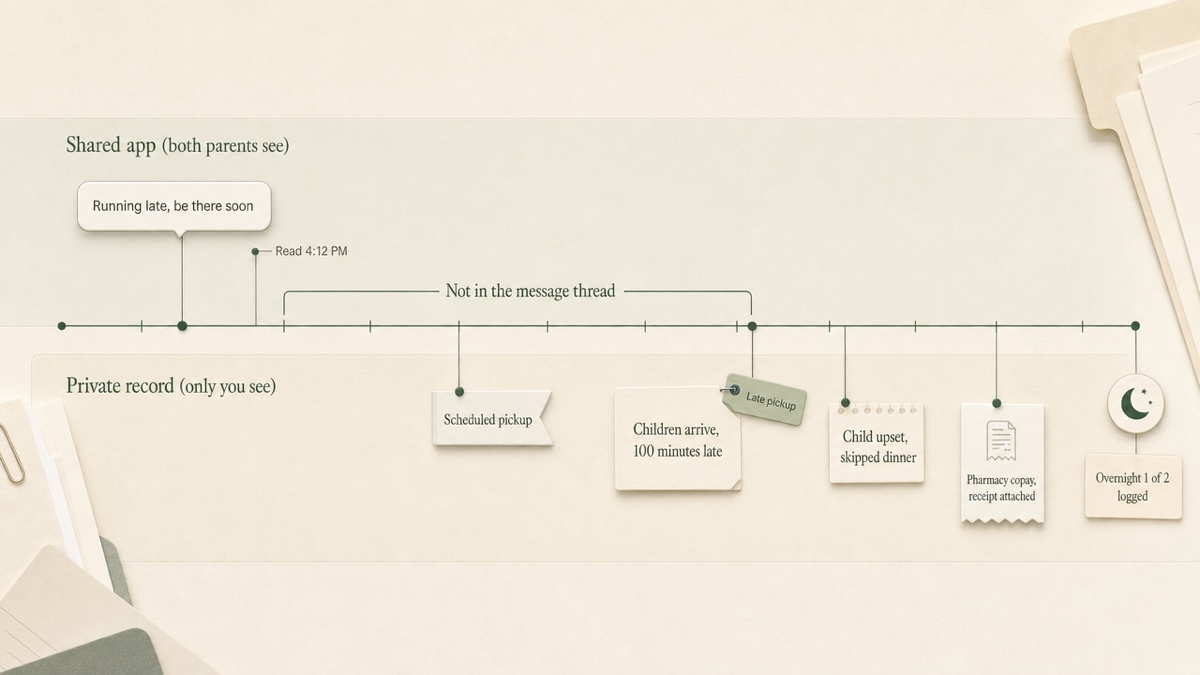
A shared app is a communication record. It shows what each parent sent, when, and often when it was first viewed. That is valuable, and it is the job the court gave it.
But plenty of what matters in a custody case never happens inside a message thread:
- What actually happened at the exchange. The message says "running late." It doesn't say the children arrived at 7:40 for a 6:00 pickup.
- Overnights against the schedule. A shared calendar shows the plan. It doesn't automatically become a counted record of which nights the children actually slept at your home.
- Your own observations. How a child seemed after a weekend, a school call, a doctor's comment. These are notes for you and your attorney, not messages to the other parent.
- Things that happened offline. A missed weekend with no message at all leaves no trace in a message log.
- Your full expense history. The order may require posting reimbursement requests in the app. Your own running ledger of every child cost, with receipts and what has been paid, is a separate record.
Keeping a private record alongside the shared app
A private log is not communication with the other parent, so in general it falls outside an order that governs how parents communicate. That can change if you share it, post it, or let the children see it. Still, ask your attorney, and keep these lines clear:
- Never use a private tool to message the other parent. The ordered app is the channel.
- Don't run duplicate reimbursement requests outside the app if the order says requests go through the app. Track the expense privately; request it where the order says.
- Stick to facts and dates. A late pickup is a time. "They always do this" is a feeling.
- Only save what you lawfully have access to.
This is the gap Custody Proof was built for. You set up your schedule from your order (upload it or describe it in plain words), log overnights and timed visits as separate counts, and compare the plan against what you logged day by day. You can flag late pickups and missed visits, attach photos and files to the entry they belong to in an encrypted vault, and keep an expense ledger with receipts and a running balance. When your attorney asks, you export PDF reports, including the Court Packet. If your calendar history lives in another app, you can import a calendar export and review every entry before it saves.
The other parent is never invited or notified. Attorneys don't log in; they get the files you export.
One-parent tools vs. two-parent tools
The difference is who the record is for.
A two-parent tool assumes both parents participate. Both log in, both see the calendar, both receive notifications. That design is why courts order it: it creates a shared, neutral channel. It also means the record holds only what both of you put there.
A one-parent tool is a private workspace. It doesn't need the other parent's cooperation and doesn't show them anything. It can't replace a shared channel, and it isn't trying to. For a longer comparison, see Custody Proof vs. co-parenting apps and why co-parenting apps fall short in high-conflict cases.
Many parents under an app order use both: the ordered app for communication, a private record for everything else.
Costs and fee waivers
Most shared co-parenting apps charge a subscription, and an order may require each parent to pay for their own. Some apps offer fee waivers or reduced pricing for parents who can't afford them, and some orders address how costs are divided. Ask the app provider and your attorney what is available before assuming the cost falls entirely on you.
A private tool is a separate, optional cost. Custody Proof's Documentation plan is $14.75/month or $144/year. Case Builder, which adds Vero, the AI assistant, is $29/month or $278/year.
What to ask your attorney about the order
If an app order is proposed or already in place, these are worth raising:
- Which app is named, and can it be changed later?
- What exactly counts as an emergency, and what must you do after outside contact?
- What are the check-in and response deadlines?
- Who gets professional access to the records?
- How are subscription costs divided, and is a fee waiver an option?
- How long does the requirement last, and what ends it?
- Are private notes and logs fine to keep alongside it?
- How are app exports authenticated as evidence in your state, and should you preserve anything now?
That last question matters. Evidence rules differ by state, and screenshots of messages don't always meet them. Your attorney will know what your court expects.
Start your private record
If you are using an ordered app, keep using it. If you also need your own dated record of overnights, incidents, and receipts, start a Custody Proof record. It's charged at signup, with a 30-day money-back guarantee on your first charge.
Frequently asked questions
Can I refuse to use a co-parenting app a judge ordered?
Not without consequences. A court order is binding until it is changed. If the app doesn't work for you, talk to your attorney about asking the court to modify the order. Keep complying in the meantime.
Is Custody Proof a court-approved co-parenting app?
No. It is a private documentation tool for one parent. It has no shared messaging or shared calendar, and it doesn't satisfy an order to use a shared app.
Will the other parent see my private record?
Not in Custody Proof. There is no shared account, no invitation, and no notification. If you share a record, you do it by exporting a file and handing it over.
Doesn't the shared app already keep a record?
It keeps a record of messages and posted items. It usually won't show what happened offline, which nights the children actually slept at your home compared with the schedule, or your own notes and full expense history.
Are app records automatically admissible in court?
No record is automatically admissible. Each state has its own evidence rules, and how app exports are authenticated varies. Ask your attorney what your court requires.
What if the other parent ignores the app?
Keep using it yourself and document the gaps: unanswered requests, missed exchanges, outside texts. Bring that record to your attorney rather than responding outside the order.
Keep reading
- Are Co-Parenting Records Admissible in Court? Plain Terms
- Domestic Violence Custody Case Evidence: Document Safely
- High-Conflict Custody Exchanges: Handle and Document Them
- Which custody app fits your situation
Custody Proof is a documentation tool, not a law firm. Nothing on this page is legal advice. Whether and how a record is used in a case is a question for your attorney.