How to prove text messages and call recordings in a custody case
By EJ Archuleta, Licensed attorney · Updated
To prove text messages in a custody case, you generally have to show each one is what you say it is: who sent it, when it was sent, and that nothing was cut out or changed. In practice that means keeping the original thread on the phone, capturing screenshots that show the contact, the dates and the surrounding messages, backing the phone up, and recording what happened that day next to the message. Whether a particular message is admitted, and how it gets authenticated, is your attorney's decision.
This page covers why screenshots get attacked, how to preserve what you already have, what "consent" means for call recordings, and what to ask your lawyer before you record anything. It is general information, not legal advice. Evidence and recording rules vary by state, so take questions about your own case to a family law attorney licensed where your case is filed.
What "proving" a text actually means
Courts call it authentication. Before a message can be used, someone has to offer enough to support a finding that it is genuine. For text messages the bar is usually not high. A person with knowledge can testify that they sent or received it, or the message can be tied to its author by distinctive details, such as a phone number known to belong to them or content only that person would know. Some courts want more proof of who actually wrote a message, especially if others could have used the phone or account.
The trouble starts when the other side disputes the message. Without a forensic expert, a contested text can turn into a credibility contest between you and the other parent. A cell phone forensics expert can extract a phone's data as it exists at that moment and examine changes the user made, but many parents cannot afford that, especially those representing themselves.
So the realistic goal is not proving a text beyond any doubt. It is to make a challenge hard to sustain: your screenshot matches the original, the original still exists, and the date fits everything else in your record.
Why screenshots get challenged
A screenshot is a picture of a conversation, not the conversation. It can be attacked for several reasons.
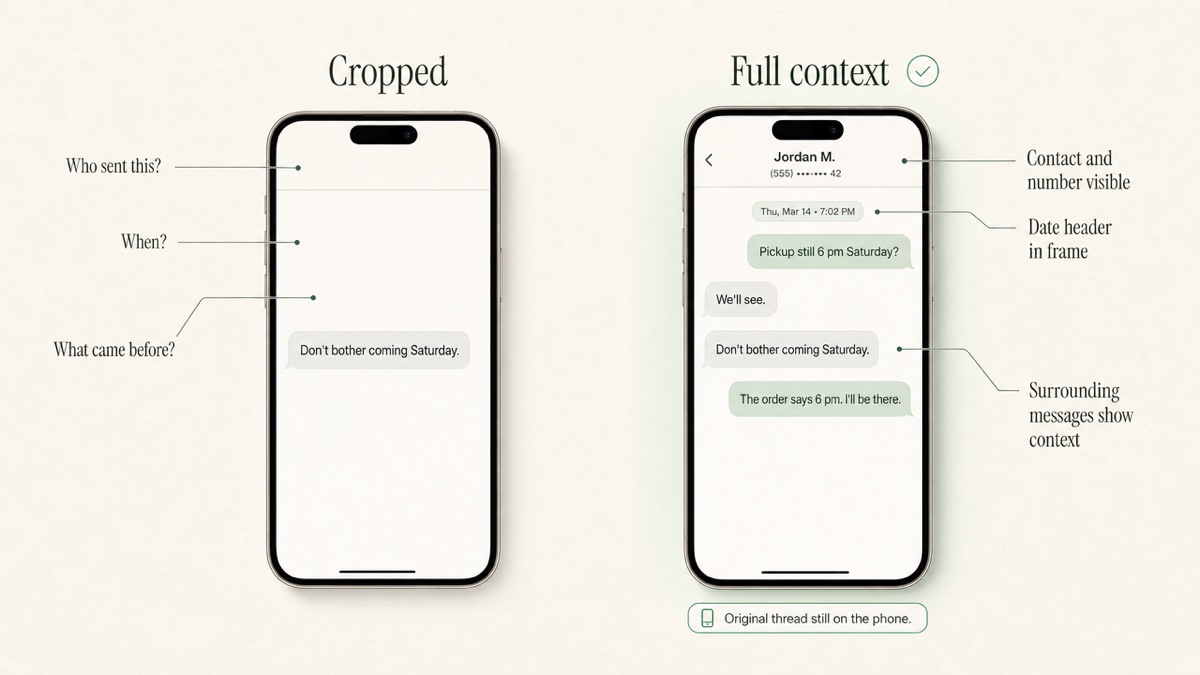
- Cropping. A screenshot that starts mid-argument invites the obvious question: what came before? Custody evaluators often ask for both sides of a thread because parents sometimes leave out key parts, on purpose or not.
- Missing metadata. A screenshot may not show the exact send time, every recipient, or which phone number the contact name points to. Some courts have had to work out when a message was sent because only a screenshot existed.
- Edits and unsends. Some messaging apps let a sender edit or unsend a message after delivery. Your screenshot may show a version that no longer matches what is on either phone.
- Disappearing messages. Some apps delete messages on a timer. If the original is gone, your screenshot is the only copy, which is exactly the situation that draws a challenge.
- A destroyed original. Courts have excluded screenshots when the person offering them deleted the account or discarded the phone holding the original. Courts have also excluded screenshots shown to be altered.
Whether an edit or unsend leaves a visible trace depends on the app, the software versions on both phones, and the settings. Do not assume either way. If an edited or unsent message matters to your case, tell your attorney early, while the phones still hold whatever they hold.
Preserve the originals first
Screenshots are a working copy. The original is the evidence your attorney may need to fall back on.
- Keep the phone and the thread. Do not delete the conversation, the contact or the app. If you replace your phone, keep the old one and ask your attorney before resetting it.
- Back up the device. Use your phone's normal backup. A backup is not a forensic extraction, but it guards against a lost or broken phone.
- Capture full threads, not single bubbles. Scroll and screenshot in overlapping sections so each image shares a message with the next. Gaps are where challenges live.
- Get the contact information in frame. Open the contact details and screenshot the name and phone number or email that the thread is tied to.
- Note dates the screen does not show. If the app hides timestamps until you tap or swipe, reveal them before capturing.
- Ask about export tools. Dedicated export tools can preserve a text history in a form a lawyer can take to court. Your attorney may prefer one method over another, or want metadata requested formally from the other side.
- Save emails as emails. Forward or download the original message rather than screenshotting a preview.
For a broader system, see how to stop losing evidence.
Pair each message with the day's log entry
A text in isolation is an argument waiting to happen. A text attached to a dated entry is part of a record.
When a message matters, write a short entry the same day: the date, what was scheduled, what happened, and which message relates to it. "Saturday 6:00 p.m. pickup per the order. Waited until 6:50. No child. Text at 5:12 p.m. attached." The message explains the event, and the event explains why the message matters.
This is the same discipline as logging missed visitation and late pickups: times, dates and attachments, not adjectives.
Put communications on a timeline, not in a camera roll
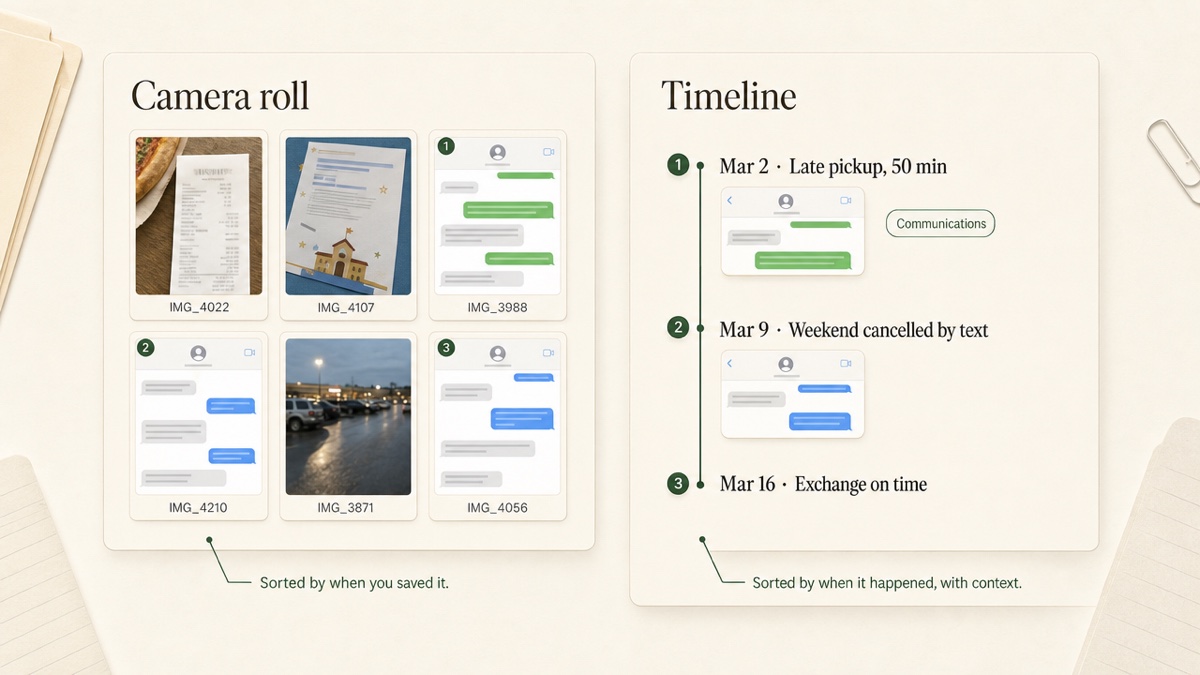
A camera roll sorts by when you took the screenshot, not when the message was sent, and it mixes custody evidence with grocery lists. Two months later, nobody can find the right image, and nobody can tell which exchange it belonged to.
Sort communications by the date of the event. Label each one. Keep the related photo, receipt or note with it. When your attorney asks what happened in March, you hand over March in order, not a folder of `IMG_` files.
Call recordings: what consent means
Recording a phone call is a different question from saving a text, and the stakes are higher.
As a general principle, U.S. recording laws fall into two groups. Under federal law and in most states, a person who takes part in a conversation may record it without telling the others. This is often called one-party consent. A minority of states require all-party consent, meaning everyone on the call must agree. Recording a conversation you are not part of, without any party's consent, is generally a crime everywhere, and intercepting someone else's texts or email can be too.
Several things make this harder than it sounds:
Calls across state lines may raise the question of which state's rule applies. If anyone on the call is in an all-party consent state, the safest approach is to follow the stricter rule.
- A legal recording is not automatically usable. Some statutes bar illegally made recordings from civil cases. Family courts often have broad discretion over relevant evidence in custody matters, but that discretion usually does not override laws that bar illegally made recordings, and the recording can still expose you to criminal or civil liability.
Your order may address it. Some parenting plans limit how parents communicate or whether they may record.
Talk to your attorney before you record anyone. If you already have recordings, tell your attorney what they are and how they were made, and let them decide what happens next.
Recording children and exchanges
Even where recording is lawful, recording a child or secretly recording at exchanges carries risks beyond the statute.
Judges and custody evaluators look at how each parent protects the child from the conflict. A recording of a child describing the other parent can read as pulling the child into the dispute. A phone held up at every exchange can make exchanges tenser and can become the story instead of the late pickup. Your attorney can tell you how courts in your area tend to view this.
For most exchange problems, a written log of times, made the same day, does the job with far less risk.
Keep your own messages clean
Every thread you save has your side in it too. Anything you send can become an exhibit.
- Stick to logistics. Time, place, child, item. "Pickup is 6:00 at the school per the order."
- Do not argue, diagnose or threaten. No commentary on their partner, their parenting or their mental state.
- Do not send in anger. Draft, wait, cut it in half, then decide whether to send.
- Do not bait. Messages written to provoke a reply read that way to a judge.
- Put your own social media under the same rule. Opposing counsel can review it, and privacy settings are not reliable protection.
A clean record from you makes the other side's messages easier to see.
What to ask your attorney
Bring these questions to your next meeting:
- How should I capture and deliver texts so you can authenticate them?
- Do you want an export tool, screenshots, the phone itself, or all three?
- Should we request message metadata from the other side?
- Is there an edited, unsent or deleted message we should address now?
- Does our state allow one-party recording, and does my order say anything about recording?
- I already have a recording. What should I do with it?
Where Custody Proof fits
Custody Proof is a private documentation app for one parent. It does not carry messages between parents, it does not authenticate messages, and it cannot make anything admissible. What it does is keep your copies organized.
In the evidence vault, screenshots go into a Communications category with the date of the event, and files are encrypted before storage. The Timeline view shows everything in date order. Notes and attachments on calendar events, such as a flagged late pickup, sync into the evidence record so the message and the log entry stay together. On Case Builder, Vero can check whether imported screenshots match the entries they are attached to. When your attorney asks, you can export a PDF Evidence Report with exhibits or a ZIP of every file with a spreadsheet log. The other parent is never invited or notified.
Keep the originals on your phone. Use the record to make them findable. Start your record.
Frequently asked questions
Are screenshots evidence in a custody case?
They can be, but they are often challenged for cropping, missing dates, or not matching the original. Screenshots hold up better when they show the contact, the dates and surrounding messages, and when the original thread still exists. Your attorney decides how to present them.
What if the other parent edited or unsent a message?
Write down what you saw and when, keep your screenshot, and do not delete the thread. What the phones still show depends on the apps and versions involved. Tell your attorney early, because preserving the devices may matter.
Is it legal to record calls with my co-parent?
It depends on your state and sometimes on where the other parent is. Some states allow a participant to record; others require everyone's consent. Ask your attorney before recording, and check whether your order addresses it.
Can Custody Proof store messages between me and the other parent?
It stores copies you upload, such as screenshots and saved emails, in your private vault. It is not a messaging service, and nothing passes between you and the other parent through it.
Should I print my texts or give my lawyer my phone?
Ask. Some attorneys want organized screenshots first and the phone later; some want an export tool's output. Keep the phone intact either way so the original is available if a message is disputed.
Keep reading
- How to Prepare Evidence for Custody Court
- How to Track Child Expenses With an Uncooperative Co-Parent
- How to Choose a Co-Parenting App: Shared or Private?
- Which custody app fits your situation
Custody Proof is a documentation tool, not a law firm. Nothing on this page is legal advice. Whether and how a record is used in a case is a question for your attorney.